Disclosure: This article may contain affiliate links. As an Amazon Associate I earn from qualifying purchases.
Editorial note: This comparison is based on current manufacturer specifications, retailer information and publicly available product documentation. We have not conducted hands-on laboratory testing of every printer listed below. Prices and availability can change.
If you’re looking for an inkless A4 printer in Australia, there are now quite a few portable thermal models to choose from.
They may look similar, but there are meaningful differences in paper support, connectivity, portability, battery capacity, software support and overall price.
We’ve compared five options ranging from Kmart’s inexpensive Anko printer through to Brother’s professional PocketJet range.
The goal isn’t to name one printer that’s perfect for everyone. Instead, we’ve picked models that make sense for different types of buyers.
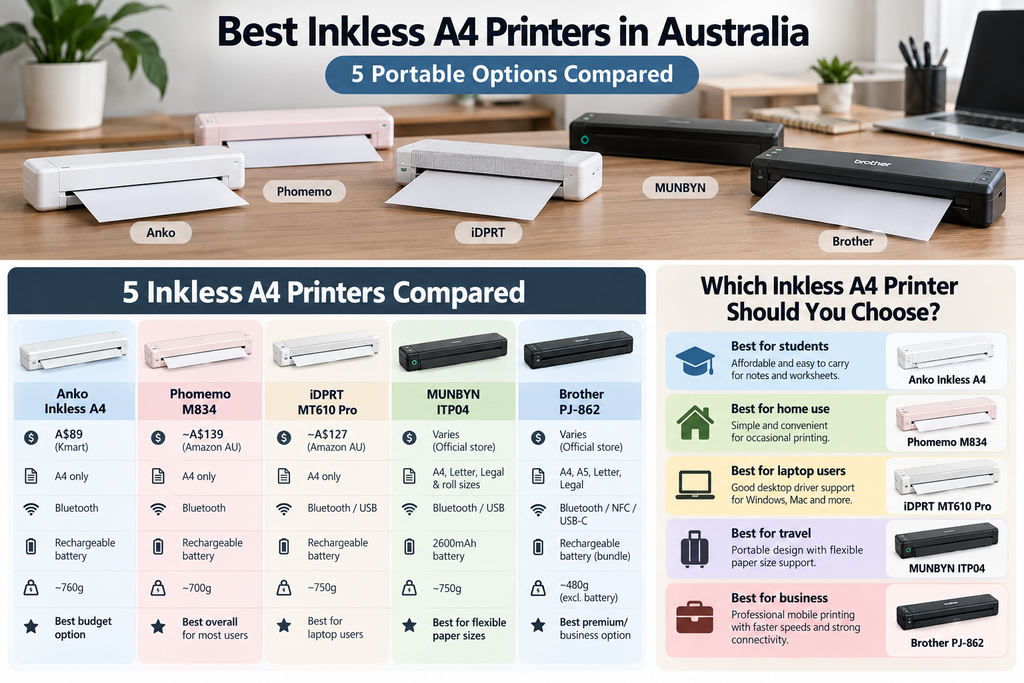
Best Inkless A4 Printers in Australia: Quick Picks
| Printer | Best for | Why we picked it |
| Phomemo M834 | Best overall for most users | Portable A4 thermal printing with mobile-friendly features and broad availability |
| Anko Inkless A4 Printer | Best budget option | Low entry price and easy Australian retail access through Kmart |
| iDPRT MT610 Pro | Best alternative for laptop users | Portable A4 design with official driver support across several desktop platforms |
| MUNBYN ITP04 | Best for flexible paper sizes | Supports A4, Letter, Legal and several thermal roll sizes |
| Brother PJ-862 | Best premium/business option | Professional mobile printing, strong connectivity and much faster print speeds/ |
1. Phomemo M834 – Best Overall for Most Users
Best for: students, travellers, home users and people who want a mainstream portable thermal printer.
The Phomemo M834 is one of the more recognisable portable A4 thermal printers currently available in Australia.
Phomemo sells the M834 through its Australian online store alongside several other Letter/A4 thermal printers, and the company specifically markets its portable range for mobile document printing.
Like other direct thermal printers in this guide, it doesn’t use ink cartridges. Instead, it requires compatible thermal paper.
Why we like it
- Designed specifically for portable document printing
- Bluetooth mobile printing
- Suitable for A4 thermal documents
- No ink or toner required
- Strong ecosystem of compatible Phomemo paper and accessories
- Available from multiple online sellers
What to consider
For a closer look at its 300dpi printing, battery, paper compatibility and limitations, read our full Phomemo M834 printer review.
The biggest limitation is the same one that applies to most portable thermal printers: you’re dependent on compatible thermal paper and black-and-white output.
For occasional documents and portable use, we think that trade-off is reasonable. For colour printing or permanent records, it isn’t.
If you’re comparing Phomemo models, our Phomemo M08F portable printer review covers the simpler 203dpi A4/Letter option in detail.
Check the Phomemo M834 on Amazon Australia
2. Anko Inkless A4 Printer – Best Budget Option
Best for: Australian buyers wanting to try inkless printing without spending much.
Kmart’s Anko Inkless A4 Printer is one of the most accessible options in this comparison.
At the time of writing, Kmart lists it for A$89. It includes Bluetooth connectivity, Type-C charging and an internal rechargeable battery.
Its compact body measures approximately 26.5cm wide, 8.2cm high and 4.8cm deep, making it considerably easier to store than a conventional desktop printer.
Why we like it
- Very accessible entry price
- Available through a major Australian retailer
- Bluetooth mobile printing
- Rechargeable battery
- USB Type-C charging
- Simple black-and-white document printing
What to consider
It requires compatible thermal paper and cannot print colour.
The internal batteries are also described by Kmart as non-removable and non-replaceable, which is something to keep in mind if you’re planning to use the printer for many years.
We’ve covered this model in much more detail in our Anko Inkless A4 Printer review.
3. iDPRT MT610 Pro – Best Alternative for Laptop Users
Best for: users who want a portable A4 printer with broader desktop operating-system support.
iDPRT officially lists the MT610 Pro as a portable A4 printer.
One thing that stands out is its desktop support. iDPRT provides official drivers for Windows, macOS, Chrome and Linux systems, which could make it attractive if you intend to print mainly from a laptop rather than relying completely on a smartphone app.
Why we like it
- Designed for portable A4 printing
- Official Windows driver support
- Official macOS support
- Chrome driver available
- Linux driver available
- Alternative to the more common Phomemo-style models
What to consider
Availability in Australia can vary depending on the seller, so we’d check both local stock and warranty arrangements before purchasing.
We’d also confirm the exact paper format and connectivity features of the specific listing you’re buying, because retailers sometimes sell several similar iDPRT models under closely related names.
See iDPRT portable printer options on Amazon Australia
4. MUNBYN ITP04 – Best for Flexible Paper Sizes
Best for: people who want more paper-format flexibility than a basic A4-only thermal printer.
MUNBYN’s ITP04 is an interesting alternative because its official Australian specifications list support for A4, US Letter and Legal thermal paper as well as several roll sizes.
It supports Bluetooth connectivity for iOS and Android devices and USB connectivity for Windows and Mac computers.
MUNBYN lists the printer at around 750g and equips it with a 2600mAh rechargeable battery.
Why we like it
- A4 and US Letter support
- Legal-size thermal paper support
- Supports several narrower roll sizes
- Bluetooth for mobile devices
- USB for Windows and Mac
- 2600mAh built-in battery
- Australian local-stock support
What to consider
The main drawback right now is availability. MUNBYN Australia’s official store currently shows the ITP04 as sold out.
That doesn’t necessarily mean you won’t find stock elsewhere, but we wouldn’t choose it purely on specifications until you’ve confirmed where you can actually buy it.
5. Brother PJ-862 – Best Premium and Business Option
Best for: field workers, businesses and buyers who want a professional portable A4 printer rather than the cheapest possible option.
The Brother PJ-862 sits in a very different category from the inexpensive consumer thermal printers above.
It’s part of Brother’s PocketJet mobile-printer range and is designed for professional mobile document printing.
Brother lists a print speed of up to 13.5 pages per minute, 203dpi output, Bluetooth, NFC and USB connectivity.
The printer is approximately 25.5cm wide and weighs around 480g excluding the battery, making it impressively compact considering its business focus.
If you also need to scan contracts, forms or signed documents while working away from the office, see our guide to the best portable printer and scanner for mobile all-in-one and separate scanner options.
If you need to print invoices, quotes, work orders or other documents while travelling between jobs, see our guide to the best portable invoice printer in Australia for a comparison of A4 inkjet and thermal options for mobile business use.
Why we like it
- Professional mobile-printing design
- Up to 13.5ppm printing
- Bluetooth connectivity
- NFC
- USB-C connectivity
- A4, A5, Letter and Legal support
- Rechargeable battery included in the Australian bundle
- Brother Australian support
What to consider
This is unlikely to be the best-value choice if you simply want to print a few study notes at home.
Its strengths make more sense for people using a printer as part of their work, particularly where reliability, connectivity and faster output matter more than the lowest purchase price.
Inkless A4 Printer Comparison
| Model | Position | Mobile printing | Computer support | Best use |
| Phomemo M834 | Mid-range | Yes | Yes | General portable use |
| Anko Inkless A4 | Budget | Yes | Yes | Occasional home/student use |
| iDPRT MT610 Pro | Mid-range | Model dependent | Windows, macOS, Chrome, Linux drivers available | Laptop/mobile work |
| MUNBYN ITP04 | Mid-range | Bluetooth | Windows and Mac via USB | Multiple paper sizes |
| Brother PJ-862 | Premium | Bluetooth | USB-C | Professional/business use |
Which Inkless A4 Printer Would We Choose?
For most people looking for a balance of portability, availability and everyday usability, we’d start by comparing the Phomemo M834.
If keeping the initial cost as low as possible matters more, the Anko Inkless A4 Printer is an appealing Australian option because you can buy it through Kmart rather than relying entirely on an overseas marketplace seller.
If you need broader paper-size flexibility, the MUNBYN ITP04 has an attractive specification sheet, although its current Australian availability is a downside.
For professional mobile work, we’d move up to the Brother PJ-862. It’s more printer than most home users need, but it’s also designed for a much more demanding environment.
What to Check Before Buying an Inkless A4 Printer
1. Paper availability
Check the exact thermal paper required before buying the printer.
We wouldn’t choose a model unless replacement A4 paper is easy to source at a price you’re comfortable paying.
Before choosing a printer, see our guide to the best A4 thermal printer paper in Australia to compare compatible paper types, sheets versus rolls and what to check before ordering.
2. Mobile app quality
Many inexpensive thermal printers rely heavily on a companion smartphone app.
Check recent app-store reviews as well as the printer’s hardware reviews.
3. Computer compatibility
If you want to print from a laptop, confirm that proper drivers are available for your operating system.
This is especially important for Mac, ChromeOS and Linux users.
4. Battery specifications
A rechargeable printer is only useful on the road if the battery lasts long enough for the way you intend to use it.
Also check whether the printer can operate while charging.
5. Warranty and local support
For Australian buyers, local support can be worth paying a little extra for.
A low-cost marketplace printer may look attractive until you need warranty assistance or replacement accessories.
6. What you actually print
If you need colour, photographs or permanent records, don’t buy a thermal printer simply because it doesn’t need ink.
If you’re deciding between a portable thermal printer and a more conventional option, see our thermal printer vs laser printer comparison for the key differences in paper, running costs, speed, portability and document lifespan.
You can read our broader guide on whether inkless printers are worth it if you’re still deciding whether this type of printer suits you.
Are Inkless A4 Printers Good for Travel?
This is one of their strongest use cases.
A portable A4 thermal printer can be dramatically easier to carry than a conventional printer because there’s no large paper tray or cartridge system.
For caravan travel, mobile work, university or occasional business trips, that can make physical printing much more practical.
You still need to carry thermal paper, though, so we wouldn’t describe them as completely supply-free.
If you regularly work from a vehicle, see our guide to the best portable printer for car use, where we compare battery-powered inkjet and thermal options for invoices, forms and other mobile documents.
Are Inkless A4 Printers Good for Home Use?
They can be, particularly in households that print infrequently.
If your printing is mostly forms, notes, worksheets and temporary documents, the lack of cartridges can be convenient.
If your household regularly prints colour schoolwork, photographs or important paperwork that needs to be stored for years, we’d rather have an inkjet or laser printer as the main household machine.
Teachers who regularly print worksheets, lesson plans and classroom material can see our guide to the best printer for teachers for higher-capacity ink-tank and laser options.
If you decide to use an inkjet instead, our guide on how often you should use an inkjet printer explains a simple routine to help reduce clogged nozzles and dried ink.
If you only print every few weeks or months, see our guide to the best printer for occasional use in Australia to compare laser, inkjet and thermal options.
If you’re choosing a main printer for schoolwork at home, see our guide to the best printer for homeschooling in Australia, where we compare ink tank and laser options for worksheets, colour projects, scanning and regular home learning.
Our Verdict
There isn’t one best inkless A4 printer for every Australian buyer.
The Phomemo M834 looks like the most balanced general-purpose option in this group, while the Anko Inkless A4 Printer stands out for affordability and easy local access.
The MUNBYN ITP04 is attractive if flexible paper support matters, and the Brother PJ-862 is the clear step up for business users who need a professional mobile printing solution.
The biggest thing we’d check before buying any of them is not the printer itself — it’s the paper.
Make sure compatible thermal paper is easy to buy, then choose the model whose connectivity, battery and portability best match the way you actually work.
Frequently Asked Questions
What is the best inkless A4 printer in Australia?
There isn’t a single best model for everyone. For general portable use we’d start by comparing the Phomemo M834, while budget buyers may prefer Kmart’s Anko Inkless A4 Printer and business users may be better served by the Brother PJ-862.
What is the cheapest inkless A4 printer in Australia?
Among the models in this comparison, Kmart’s Anko Inkless A4 Printer is currently one of the lowest-cost locally available options at A$89. Prices can change.
Do inkless A4 printers use normal paper?
Most direct thermal A4 printers require compatible thermal paper rather than standard untreated copy paper.
Can an inkless A4 printer print colour?
Most portable direct thermal models print only in black and white.
Are portable thermal printers good for students?
They can be useful for students who mainly print notes, worksheets and temporary documents and want something compact enough to store easily.
Which portable printer is best for business?
For professional mobile work, the Brother PJ-862 offers more business-focused features, faster print speeds and stronger connectivity than basic consumer thermal printers.
Sources and Further Reading
- Kmart Australia – Inkless A4 Printer
- Phomemo Australia – Portable Printer Range
- iDPRT – MT610 Pro Portable A4 Printer
- MUNBYN Australia – ITP04
- Brother Australia – PJ-862
- WorkTechScout – Anko Inkless A4 Printer Review
- WorkTechScout – Are Inkless Printers Worth It?
Prices, availability and specifications can change. Check the current retailer or manufacturer’s listing before purchasing.