Disclosure: This article may contain affiliate links. As an Amazon Associate I earn from qualifying purchases.
Editorial note: This review is based on current manufacturer specifications, product documentation, retailer information and publicly available information. We have not conducted a hands-on laboratory test of the printer. Prices, bundles and availability can change.
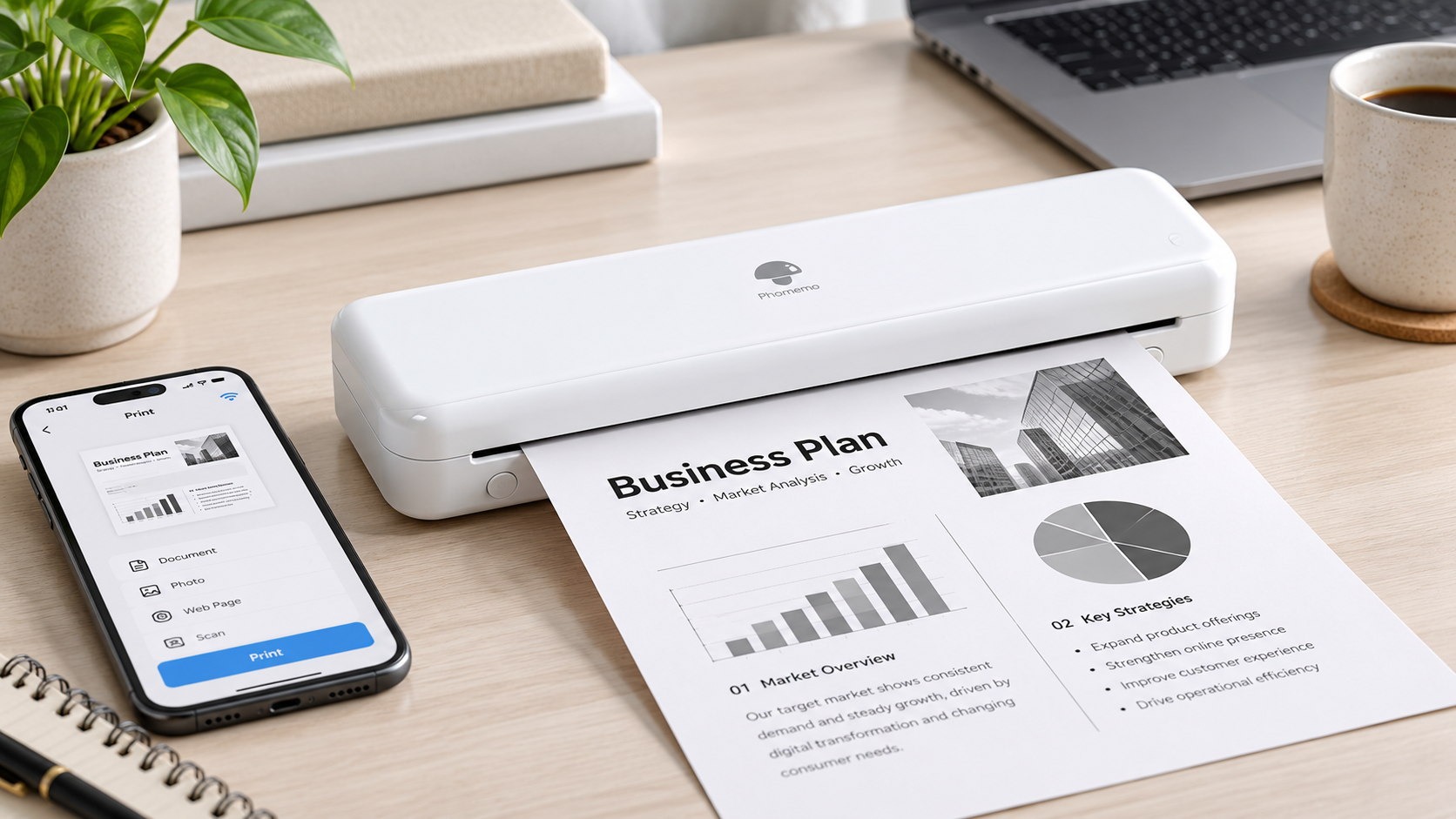
If you’re considering a Phomemo M834 printer in Australia, its biggest attraction is fairly straightforward: it gives you portable A4 document printing without needing ink cartridges or toner.
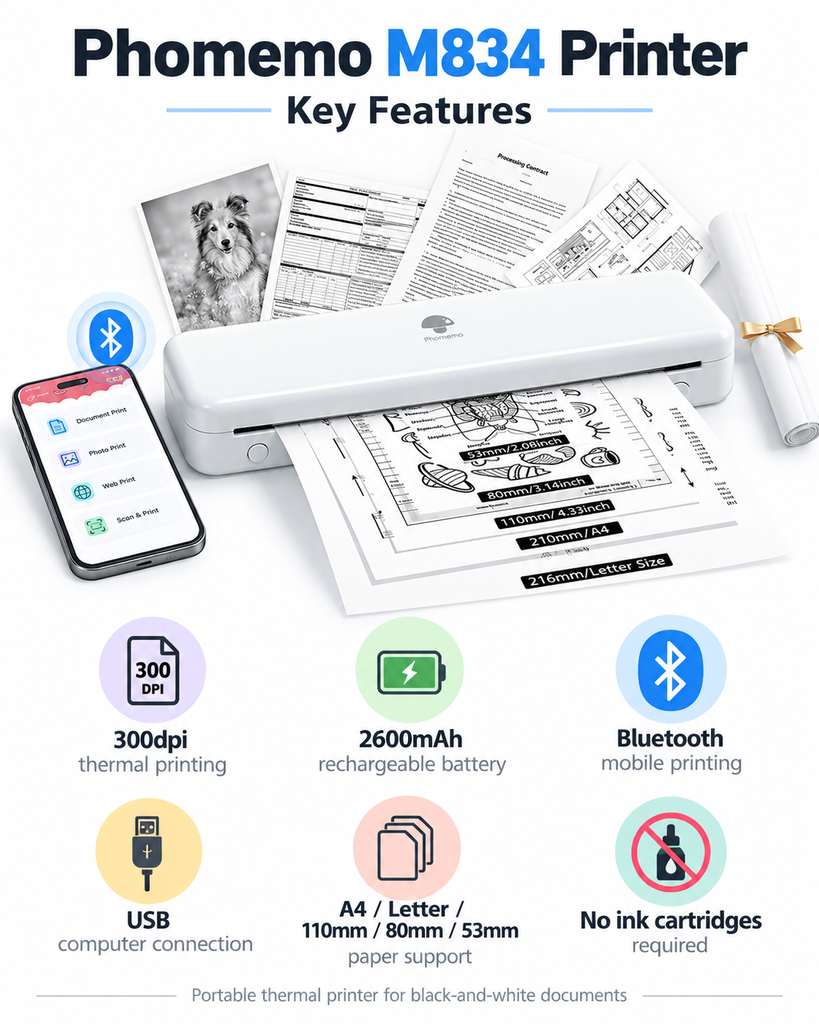
The M834 combines 300dpi direct thermal printing, a rechargeable 2600mAh battery, Bluetooth mobile printing and support for several thermal-paper sizes in a compact body.
That makes it potentially useful for students, travellers, mobile workers and people who only need occasional black-and-white documents.
However, like every direct thermal printer, there are compromises. You need compatible thermal paper, there is no colour printing, and thermal documents are not ideal for records that need to remain readable permanently.
So, is the Phomemo M834 actually worth buying in Australia? Here’s what to know before ordering one.
Phomemo M834 Printer Review: Quick Verdict
Our editorial rating: 8/10
The Phomemo M834 printer looks like one of the more versatile portable thermal printers for buyers who want full-size A4 printing without carrying a conventional inkjet printer.
Its strongest features are the 300dpi resolution, large 2600mAh rechargeable battery and flexible paper support. Unlike some portable printers that are essentially limited to A4 sheets, the M834 can work with A4, Letter and narrower thermal paper in several formats.
We think it makes the most sense as a secondary or portable printer rather than a complete replacement for a normal household printer.
Best for: students, travel, mobile workers, occasional home printing, forms, notes, invoices and temporary documents.
Not ideal for: colour printing, photographs, very high-volume printing or important documents that need permanent archival storage.
Check the Phomemo M834 on Amazon Australia
Phomemo M834 Specifications
| Model | Phomemo M834 |
| Printing technology | Direct thermal / inkless |
| Resolution | 300dpi |
| Print colour | Black and white |
| Paper sizes | A4, Letter, 110mm, 80mm and 53mm thermal paper |
| Paper formats | Thermal sheets, folded paper and compatible rolls |
| Mobile connection | Bluetooth |
| Computer connection | USB |
| Mobile platforms | iOS and Android |
| Computer support | Windows, macOS and other supported desktop platforms |
| Battery | 2600mAh rechargeable lithium battery |
| Approx. weight | 690g |
| Approx. dimensions | 263 × 78 × 40mm |
| Charging interface | USB Type-C |
What Is the Phomemo M834?
The Phomemo M834 is a portable direct thermal printer designed primarily for documents.
Instead of spraying ink or applying toner to ordinary paper, a thermal printhead applies heat to specially coated thermal paper. The coating reacts to the heat and creates the printed image.
The obvious advantage is that there are no ink cartridges or toner cartridges to replace.
The trade-off is that ordinary A4 photocopy paper generally cannot be used. You need thermal paper designed for the printer.
If you’re still deciding whether this technology makes sense at all, read our guide on whether inkless printers are worth it before choosing a particular model.
Design and Portability
Portability is one of the main reasons to consider the M834.
Phomemo lists the printer at approximately 263 × 78 × 40mm and around 690g.
That is small enough to fit into many laptop bags, backpacks, drawers or vehicle storage areas without taking up the space of a traditional desktop printer.
There is also no bulky cartridge compartment or conventional A4 paper tray to deal with.
For someone who works from different locations, studies between home and university or travels frequently, that size can be much more useful than simply buying another conventional printer.
It is still another device plus paper to carry, however, so we wouldn’t call it pocket-sized.
How Good Is the 300dpi Printing?
One of the main advantages of the Phomemo M834 printer over some cheaper portable thermal models is its 300dpi printing resolution.
For comparison, a number of entry-level portable A4 thermal printers use 203dpi printheads.
Higher resolution can be useful when printing:
- small text
- forms
- invoices
- study material
- QR codes
- basic diagrams
- contracts and other text-heavy documents
That doesn’t turn the M834 into a photo printer. It remains a monochrome thermal printer, so buyers wanting photographs or high-quality colour graphics should look elsewhere.
For everyday black-and-white documents, however, 300dpi is a useful specification to have.
What Paper Does the Phomemo M834 Use?
This is one of the M834’s strongest features.
Phomemo lists support for:
- A4 thermal paper
- US Letter thermal paper
- 110mm thermal paper
- 80mm thermal paper
- 53mm thermal paper
The printer can also work with different compatible thermal-paper formats, including sheets, folded paper and rolls.
That gives it considerably more flexibility than a portable printer designed around one A4 paper format only.
However, size alone does not guarantee compatibility. We’d still confirm that the specific paper you’re purchasing is designed to work with the M834 before buying a large pack.
We’ve covered the different formats, compatibility issues and buying options in our guide to the best A4 thermal printer paper in Australia.
Can You Use Normal A4 Paper in the Phomemo M834?
Normally, no.
The M834 uses direct thermal printing, which means it relies on heat-sensitive thermal paper to create the printed image.
Standard untreated A4 copy paper doesn’t have that coating.
This is important when comparing running costs. You don’t need ink cartridges, but compatible thermal paper becomes the consumable you’ll continue purchasing.
Printing From a Phone
The M834 supports Bluetooth connectivity for mobile printing.
Phomemo uses its own mobile application for compatible iOS and Android devices.
The app can be used to send supported documents and other printable content to the printer without connecting a computer.
This is one of the biggest practical advantages of a portable printer. If the file you need is already on your phone or tablet, you don’t necessarily need to unpack a laptop just to print it.
As with any printer that depends partly on a companion app, we’d recommend checking current app compatibility with your phone before purchasing.
Can the Phomemo M834 Print From a Laptop?
Yes.
The M834 isn’t limited to smartphone printing.
Phomemo provides computer drivers and supports USB printing from compatible desktop and laptop operating systems.
This makes it more useful for people who work mainly with PDFs, Word documents, spreadsheets or files stored on a laptop.
Phomemo’s current product information lists support across platforms including Windows and macOS, with additional support listed for ChromeOS and Linux.
You can find the latest drivers through the official Phomemo driver download page.
Battery Life
The Phomemo M834 printer contains a 2600mAh rechargeable lithium battery.
That capacity is one reason the M834 stands out against some basic portable printers that use smaller batteries.
Phomemo states that the battery can handle more than 160 pages of continuous printing under its test conditions.
Actual results will naturally depend on what you’re printing, print density, connectivity, battery condition and other factors.
The more important point for most buyers is that the printer doesn’t have to remain connected to a wall outlet during normal mobile use.
For occasional printing while travelling or working remotely, that is much more convenient than carrying a conventional printer.
Does the Phomemo M834 Need Ink?
No.
The M834 is a direct thermal printer, so there are no ink cartridges, toner cartridges or ribbons required for normal document printing.
That can be particularly attractive to occasional users.
If you’ve previously owned an inkjet that sat unused for months before you discovered dried or clogged cartridges, thermal printing removes that particular maintenance problem.
But inkless doesn’t mean free printing.
You still need compatible thermal paper, and depending on how much you print, paper cost should be considered before buying.
Advantages of the Phomemo M834
300dpi resolution
The 300dpi printhead gives the M834 an advantage over many basic 203dpi portable thermal printers when clarity matters.
No ink or toner
You don’t need to keep replacement cartridges around or worry about unused ink drying out.
Flexible paper support
A4, Letter and narrower thermal-paper sizes make the M834 useful for more than one document format.
Multiple paper formats
Support for compatible rolls, folded paper and sheets gives you more flexibility in how you carry and load paper.
Large rechargeable battery
The 2600mAh battery is a strong specification for a printer designed to be carried around.
Phone and computer printing
Bluetooth mobile printing and USB computer support mean you aren’t locked into one type of device.
Compact size
At roughly 690g, the M834 should be considerably easier to carry than a conventional A4 printer.
Disadvantages of the Phomemo M834
Thermal paper is required
You can’t simply use the standard copy paper already sitting next to your normal printer.
No colour printing
The printer is designed for black-and-white thermal output.
Not ideal for permanent records
Thermal paper can deteriorate and fade depending on the paper itself and how it is stored.
The National Archives of Australia advises that thermal paper should not be considered suitable for records of permanent or long-term value.
Paper becomes your ongoing consumable
You save money on cartridges, but you’ll continue purchasing specialised thermal paper.
Not designed for heavy office workloads
A portable thermal printer makes more sense for occasional and mobile printing than large-volume office printing.
Phomemo M834 vs M08F
The M834 and M08F are both portable Phomemo document printers, but there are some meaningful differences.
| Feature | Phomemo M834 | Phomemo M08F |
| Resolution | 300dpi | 203dpi |
| Battery | 2600mAh | 1200mAh |
| Paper sizes | A4, Letter, 110mm, 80mm, 53mm | A4 and Letter |
| Weight | Approx. 690g | Approx. 715g |
| Best reason to choose it | Higher resolution and more paper flexibility | Simpler A4/Letter portable printing |
If you’re mainly interested in the simpler 203dpi model, read our full Phomemo M08F portable printer review for its A4 printing, battery, connectivity and limitations.
Based purely on specifications, we’d favour the M834 if the price difference is reasonable.
The higher resolution, larger battery and wider range of paper sizes make it the more flexible model.
Phomemo M834 vs Kmart Anko Inkless A4 Printer
Australian buyers may also be comparing the M834 with Kmart’s cheaper Anko Inkless A4 Printer.
The Anko has one major advantage: simplicity and easy local retail access.
The M834, however, is the more feature-rich option on paper, particularly if you value 300dpi printing and flexible paper sizes.
We’d lean towards the Anko if keeping the upfront cost low is your main priority.
We’d lean towards the M834 if you expect to use the printer more regularly and value its additional paper flexibility and higher-resolution printing.
You can see the cheaper option in our full Anko Inkless A4 Printer review.
Who Is the Phomemo M834 Best For?
We think the M834 makes the most sense for:
- students printing notes and worksheets
- travellers who occasionally need physical documents
- mobile workers
- people working from vehicles or temporary offices
- small homes with limited printer space
- people who print infrequently and don’t want ink cartridges drying out
- buyers who want several thermal-paper size options
It could also work well as a secondary printer even if you already own an inkjet or laser printer at home.
Who Should Avoid It?
We’d choose something else if you regularly need:
- colour documents
- photo printing
- hundreds of pages at a time
- very cheap standard copy paper
- permanent archival records
- a large automatic paper tray
In those situations, a normal inkjet or laser printer is likely to be a better primary machine.
Is Thermal Paper Suitable for Important Documents?
This is one limitation buyers shouldn’t ignore.
Thermal paper reacts to heat and can also be affected by light, friction and certain chemicals.
The National Archives of Australia warns that modern thermal papers are relatively unstable and should not be considered suitable for permanent or long-term records.
That doesn’t mean the M834 is unsuitable for everyday printing.
For temporary forms, study notes, travel documents, drafts and reference material, thermal printing can be perfectly practical.
For certificates, legal documents, important financial records or anything that must remain readable for many years, we’d use a conventional printing method and keep a digital copy.
Where Can You Buy the Phomemo M834 in Australia?
The M834 is available through online retailers including Amazon Australia, although pricing and seller availability can change.
Because marketplace sellers and promotions can change regularly, we’d check the current listing rather than relying on an old advertised price.
Check the Phomemo M834 on Amazon Australia
You can also view Phomemo’s current portable-printer range on the official Phomemo Australia website.
Is the Phomemo M834 Worth It?
For the right buyer, we think it is.
The Phomemo M834 printer combines several features we would want in a portable thermal printer: 300dpi output, a relatively large battery, multiple paper sizes, Bluetooth mobile printing and computer support.
Its biggest limitation is really the technology itself rather than the M834 specifically.
You’re tied to thermal paper, output is black and white, and printed documents aren’t the best option for long-term archival storage.
If you understand those limitations and mainly need temporary black-and-white documents, the M834 looks like a strong all-round portable option.
If you’re deciding whether a portable thermal printer makes more sense than a conventional home printer, see our thermal printer vs laser printer comparison for the differences in paper, running costs, speed, portability and document lifespan.
That’s also why we currently include it as our general-purpose pick in our comparison of the best inkless A4 printers in Australia.
If you only print occasionally and are comparing thermal with more conventional options, see our guide to the best printer for occasional use in Australia, including laser, inkjet and thermal choices.
Our Verdict
Editorial rating: 8/10
The Phomemo M834 offers a good balance between portability and flexibility.
Its 300dpi resolution and 2600mAh battery are strong specifications, while support for A4, Letter and narrower thermal-paper formats makes it more versatile than many basic portable printers.
We particularly like that it works with both phones and computers rather than forcing buyers to rely entirely on a mobile app.
We would not buy it to replace a colour inkjet or high-volume laser printer.
But for students, travellers, occasional home users and mobile workers who understand the limitations of thermal paper, the M834 is one of the more interesting portable inkless printers to consider.
Bottom line: A versatile portable thermal printer with good resolution, a large battery and useful paper flexibility, provided black-and-white thermal printing suits the way you actually work.
Frequently Asked Questions
Does the Phomemo M834 use ink?
No. The M834 uses direct thermal printing and therefore doesn’t require ink cartridges or toner.
What paper does the Phomemo M834 use?
It requires compatible thermal paper. Phomemo lists support for A4, Letter, 110mm, 80mm and 53mm thermal-paper sizes.
Can the Phomemo M834 use normal A4 paper?
No. Standard untreated A4 copy paper is not designed for direct thermal printing. You need compatible A4 thermal paper.
Does the Phomemo M834 print colour?
No. It is designed for black-and-white thermal printing.
What resolution is the Phomemo M834?
The M834 has a 300dpi thermal printhead.
Can I print from my phone?
Yes. The printer supports Bluetooth mobile printing using Phomemo’s app on compatible iOS and Android devices.
Can the Phomemo M834 print from a laptop?
Yes. Computer printing is supported through USB with the appropriate Phomemo driver installed.
Does the Phomemo M834 work with Mac?
Yes. Phomemo provides support for compatible macOS computers through its desktop driver system.
How big is the Phomemo M834 battery?
Phomemo lists a 2600mAh rechargeable lithium battery.
Is the Phomemo M834 good for students?
It can be a good option for students who mainly print notes, worksheets, PDFs and temporary black-and-white documents and value portability.
Is the Phomemo M834 better than the M08F?
On specifications, the M834 offers 300dpi resolution, a larger 2600mAh battery and support for more paper sizes. The M08F is a simpler A4/Letter model with a 203dpi printhead.
Where can I buy the Phomemo M834 in Australia?
The M834 is available through online retailers including Amazon Australia and through Phomemo’s online store. Prices and stock can change.
Sources and Further Reading
- Phomemo – M834 Portable Printer
- Phomemo Australia – Portable Printer Range
- Phomemo – Printer Drivers and Downloads
- National Archives of Australia – Managing Records on Thermal Papers
- WorkTechScout – Best Inkless A4 Printers in Australia
- WorkTechScout – Best A4 Thermal Printer Paper in Australia
- WorkTechScout – Anko Inkless A4 Printer Review
- WorkTechScout – Are Inkless Printers Worth It?
Printer specifications, compatibility, retailer availability and pricing can change. Check the latest manufacturer and retailer information before purchasing.