Disclosure: This article may contain affiliate links. As an Amazon Associate I earn from qualifying purchases.
Editorial note: This guide is based on current Australian manufacturer specifications and availability. We have not conducted hands-on laboratory testing of every printer listed. Prices, stock and marketplace sellers can change.
Choosing a printer for homeschooling is a little different from choosing a normal home printer.
A homeschool family might print worksheets several times a week, copy pages from workbooks, scan completed assignments, make colourful activity sheets and occasionally print photographs or craft material.
That means the cheapest printer to buy is not necessarily the best choice.
Running cost, paper capacity, automatic two-sided printing, scanning and colour capability can matter much more over time.
For most Australian homeschool families, we’d start with a refillable ink-tank printer. If your household mainly prints black-and-white worksheets, however, a monochrome laser printer can make more sense.
Best Printer for Homeschooling in Australia: Quick Picks
| Printer | Best for | Colour | Auto duplex | Scanner |
| Epson EcoTank ET-3950 | Best overall | Yes | Yes | Flatbed + ADF |
| Epson EcoTank ET-2950 | Smaller homeschool families | Yes | Yes | Flatbed |
| HP Smart Tank 5105 | Simple everyday printing | Yes | Manual | Flatbed |
| Canon PIXMA G3670 MegaTank | Colour and creative projects | Yes | Manual | Flatbed |
| Brother DCP-L2640DW | Black-and-white worksheets | No | Yes | Flatbed + ADF |
1. Epson EcoTank ET-3950 – Best Overall Printer for Homeschooling
If we were choosing one printer for a busy homeschool household, the Epson EcoTank ET-3950 would be one of the first models we’d compare.
It combines the features that become useful when you’re regularly printing worksheets and teaching material:
- refillable ink tanks
- colour printing
- automatic two-sided printing
- 30-sheet automatic document feeder
- 250-sheet paper capacity
- print, scan and copy functions
- Wi-Fi and Wi-Fi Direct
Epson rates the ET-3950 at up to 18 ISO pages per minute in black and 9 in colour.
The included ink is rated for up to approximately 6,600 black pages and 5,500 colour pages under Epson’s testing methodology.
That combination is attractive for homeschooling because you can load a decent stack of paper and print an entire batch of worksheets without constantly refilling a small tray.
Why the ADF matters
An automatic document feeder can save a surprising amount of time.
If you want to scan several completed worksheets or copy multiple pages from loose teaching material, you can feed a stack into the printer rather than placing each page individually on the scanner glass.
For a household that scans schoolwork regularly, we’d consider that a meaningful upgrade.
What to consider
The ET-3950 is more printer than a family printing only a few pages per week may need.
If your homeschool printing is relatively light and you don’t need an automatic document feeder, the cheaper ET-2950 below may be the more sensible choice.
Best for: families printing worksheets and colour material frequently, especially where scanning and copying are also important.
Check the Epson EcoTank ET-3950 on Amazon Australia
2. Epson EcoTank ET-2950 – Best for Smaller Homeschool Families
The Epson EcoTank ET-2950 keeps many of the features we like about the ET-3950 but in a simpler setup.
It can print, scan and copy, supports Wi-Fi and Wi-Fi Direct, and importantly includes automatic two-sided printing.
For homeschool families, duplex printing is useful because worksheets, lesson notes and reading material can quickly consume a lot of paper.
Epson rates the ET-2950 at 15 ISO pages per minute in black and 8 in colour.
Its 100-sheet rear tray is smaller than the ET-3950’s 250-sheet capacity, and the scanner is flatbed-only rather than including an ADF.
Why we’d consider it
If you mostly:
- print worksheets
- print colour learning material
- scan one page at a time
- don’t need to copy large document stacks
then paying extra for a larger business-style machine may not be necessary.
The refillable EcoTank system is also more appealing for regular homeschool printing than repeatedly buying small conventional ink cartridges.
Best for: smaller homeschool families that want colour, duplex printing and refillable ink without needing an automatic document feeder.
Check the Epson EcoTank ET-2950 on Amazon Australia
3. HP Smart Tank 5105 – Best Simple Everyday Option
The HP Smart Tank 5105 is another refillable-tank printer worth comparing if you want something relatively straightforward.
HP lists it as a print, scan and copy model with USB and wireless connectivity.
It includes ink rated for up to approximately 6,000 black and 6,000 colour pages under HP’s stated testing conditions.
Print speed is listed at up to 12 pages per minute in black and 5 in colour.
Where it fits
The Smart Tank 5105 makes more sense for a family that wants:
- basic colour printing
- low-hassle refillable ink
- wireless printing
- a flatbed scanner
- moderate rather than extremely heavy workloads
The main compromise is that two-sided printing is manual rather than automatic.
If you regularly print long worksheets or lesson packs, we’d prefer an automatic-duplex model because manually turning pages gets annoying quickly.
Best for: families wanting a simple refillable colour printer for everyday homeschool use.
Amazon availability for this model can vary, so check the current buying options and seller before ordering.
Check current HP Smart Tank 5105 buying options on Amazon Australia
4. Canon PIXMA G3670 MegaTank – Best for Colour and Creative Projects
If your homeschool program includes lots of colourful material, we’d also compare the Canon PIXMA G3670 MegaTank.
It is a three-in-one print, copy and scan model using Canon’s refillable MegaTank system.
For families who also make cards, scrapbook pages and other creative projects at home, see our guide to the best printer for crafting for more craft-focused printer options.
Canon lists print speeds of approximately 11 images per minute in black and 6 in colour.
The printer supports a broad range of media sizes, including A4, A5, A6, envelopes, photographic paper and custom sizes.
That flexibility can be useful for:
- flash cards
- colour worksheets
- craft templates
- small posters
- photos
- cards
- project material
Canon rates replacement ink for up to around 6,000 black pages and 7,700 colour pages, although actual yield depends heavily on what you print.
The main limitation
The G3670 does not give you the same workflow advantages as a machine with an automatic document feeder and automatic duplex printing.
For heavy worksheet production, we’d lean toward the Epson ET-3950.
But for families doing a mix of traditional worksheets and colourful hands-on activities, the Canon deserves a look.
Best for: homeschool families that print a lot of colourful learning and creative material.
Check the Canon PIXMA G3670 MegaTank on Amazon Australia
5. Brother DCP-L2640DW – Best for Black-and-White Worksheets
Not every homeschool household actually needs colour.
If most of your printing consists of:
- worksheets
- reading material
- maths exercises
- lesson notes
- forms
- text-heavy assignments
then a monochrome laser printer may be the more practical option.
The Brother DCP-L2640DW can print, scan and copy and is designed for fast monochrome document printing.
It includes automatic two-sided printing, an automatic document feeder and a 250-sheet main paper tray.
Those are strong specifications for households that routinely print large batches of black-and-white material.
Why laser can make sense
Laser printers use dry toner rather than liquid ink.
That means they don’t have the same problem of liquid ink drying in printhead nozzles during periods of inactivity.
If your homeschool schedule is seasonal or you sometimes go weeks without printing, that can be useful.
Our guide on the best printer for occasional use in Australia explains this difference in more detail.
You can also see our inkjet maintenance guide if you’re comparing laser with an ink-tank printer.
Best for: homeschool families that mainly print high volumes of black-and-white worksheets and don’t need colour.
Important: the Amazon Australia listing we found for this model is an Amazon Renewed/refurbished unit, not a new printer. Check the listing condition, seller, warranty and return details before buying.
Check the Brother DCP-L2640DW Renewed listing on Amazon Australia
Which Type of Printer Is Best for Homeschooling?
There isn’t one printer technology that suits every homeschool family.
| Printer type | Best for | Main downside |
| Ink tank | Frequent colour worksheets and projects | Still uses liquid ink and needs periodic use |
| Mono laser | Heavy black-and-white worksheet printing | No colour |
| Colour laser | Fast colour documents | Higher upfront and toner costs |
| Portable thermal | Temporary black-and-white documents | Special paper and no colour |
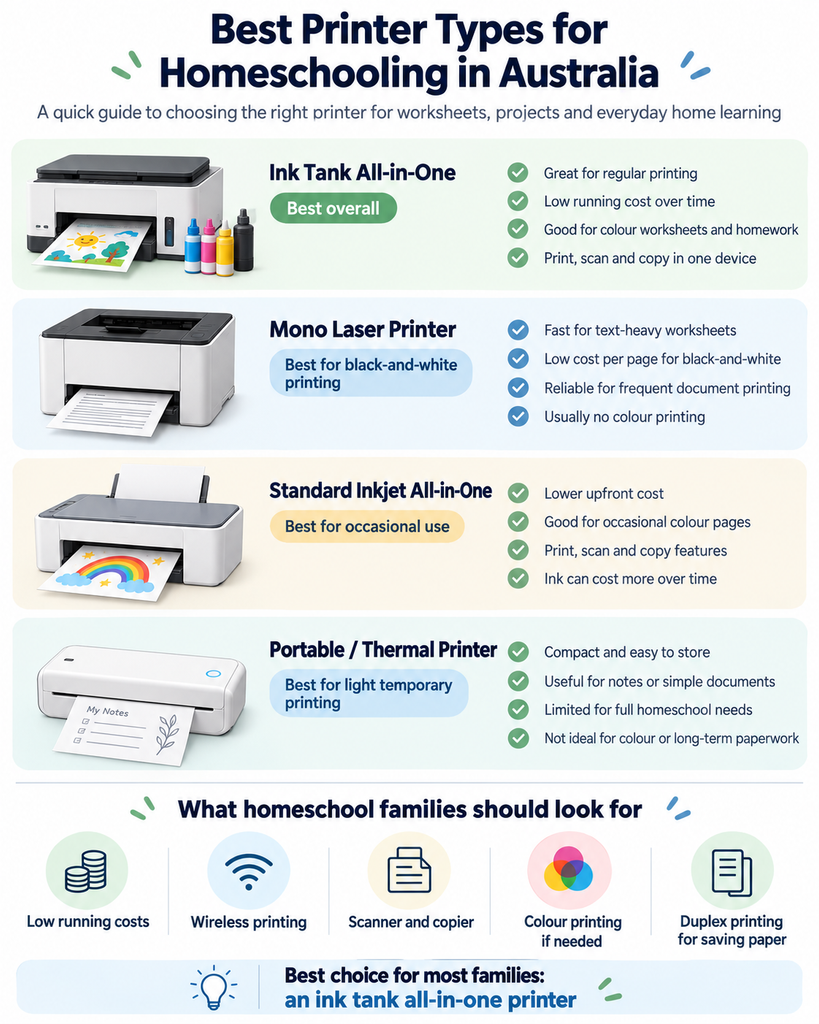
For most homeschooling households, we’d start by comparing ink tank versus mono laser.
Ink Tank vs Laser for Homeschooling
Choose an ink-tank printer if:
- you print colour worksheets
- your children use colouring pages
- you print maps and diagrams
- you want to print photographs
- you print several times each month
Choose a laser printer if:
- most printing is black and white
- you print long worksheet packs
- speed matters
- you sometimes leave the printer unused for long periods
- you don’t care about photo printing
Teachers choosing a printer for worksheets, lesson plans and classroom resources can also see our guide to the best printer for teachers, where we compare color ink-tank and laser options for home and classroom use.
If you’re still deciding between printer technologies, our thermal printer vs laser printer comparison explains some of the practical differences between toner and inkless printing.
What Features Matter Most for a Homeschool Printer?
1. Running cost
Homeschooling can involve far more printing than a normal household expects.
A printer that seems inexpensive at purchase can become expensive if it requires frequent cartridge replacements.
That’s why refillable ink-tank printers feature so heavily in this guide.
2. Automatic two-sided printing
Duplex printing can reduce paper usage and make lesson packs easier to organise.
We’d strongly prefer automatic duplex if you’re regularly printing 10, 20 or 30-page documents.
3. Scanner and copier
A scanner becomes useful when you need to:
- digitise completed work
- copy worksheets
- send assignments electronically
- keep portfolio records
An automatic document feeder is especially useful if you scan multi-page work frequently.
4. Paper capacity
A 100-sheet tray may be perfectly adequate for light home use.
For high-volume homeschooling, a 250-sheet tray means much less time refilling paper.
5. Colour
Think carefully about whether you really need colour.
You may want it for:
- geography maps
- science diagrams
- flashcards
- art projects
- younger children’s worksheets
- photographs
For older students doing mostly text-based work, black-and-white laser printing may be sufficient.
6. Wireless printing
Wireless printing is useful in a home where children may be using different laptops, tablets or phones.
All five models in this comparison support wireless printing in some form.
How Much Printing Does a Homeschool Family Actually Need?
This varies enormously.
A mostly digital homeschool may print only a few worksheets each week.
Another family may print:
- daily maths sheets
- reading passages
- science activities
- unit-study material
- colouring pages
- practice exams
- portfolio records
Before buying, we’d estimate roughly how many pages you expect to print per month.
That simple calculation can stop you from buying either too little printer or far more printer than you actually need.
Should You Buy the Cheapest Printer for Homeschooling?
Usually not.
A low purchase price can be attractive, but consumables matter much more when printing frequently.
For example, a cheap cartridge inkjet may be suitable for someone printing a couple of pages per month.
For a homeschool family producing hundreds of pages, a refillable ink tank or high-yield laser setup may be much easier to justify.
We’d compare:
- replacement ink or toner cost
- page yield
- automatic duplex
- paper capacity
- scanner features
- warranty
- current Australian availability
before focusing purely on the purchase price.
Is a Portable Thermal Printer Good for Homeschooling?
It can be useful as a secondary printer, but we would not choose one as the main homeschool printer for most families.
A portable thermal printer is convenient because it doesn’t need ink or toner.
However, most A4 thermal models:
- print only in black and white
- require special thermal paper
- don’t include a scanner
- aren’t ideal for permanent records
They can still be useful for temporary worksheets, notes and travel-based homeschooling.
If that sounds relevant, see our comparison of the best inkless A4 printers in Australia.
Our Recommendation
For most busy homeschool families, we’d start with the Epson EcoTank ET-3950.
Its combination of refillable ink, automatic duplex printing, 250-sheet capacity and automatic document feeder makes it the most complete homeschool-oriented option in this group.
If you don’t need an ADF, the Epson EcoTank ET-2950 offers many of the same advantages in a simpler package.
If nearly everything you print is black-and-white, we’d seriously consider the Brother DCP-L2640DW instead.
The right choice ultimately depends on one question:
Are you mainly printing colourful learning material, or large volumes of black-and-white worksheets?
Frequently Asked Questions
What is the best printer for homeschooling?
For a family printing a mixture of colour worksheets and black-and-white documents, we’d start by comparing a refillable ink-tank printer such as the Epson EcoTank ET-3950. For mostly black-and-white worksheets, a mono laser such as the Brother DCP-L2640DW may make more sense.
Is an EcoTank printer good for homeschooling?
Yes. Refillable EcoTank printers are particularly attractive for homeschool families that print frequently because the ink bottles provide much higher page yields than small traditional cartridges.
Is laser or inkjet better for homeschooling?
Inkjet or ink-tank printers are better when colour, photographs and creative projects matter. Laser printers are particularly strong for fast, high-volume black-and-white worksheet printing.
Do I need automatic duplex printing?
You don’t need it, but we’d strongly prefer it for homeschooling. It saves time and paper when printing long lesson packs or worksheets.
Do I need an automatic document feeder?
Not necessarily. It becomes useful if you regularly scan or copy several pages at once. Families scanning only individual pages can manage with a flatbed scanner.
Is a cheap cartridge printer good enough for homeschooling?
It may be if you print very little. For frequent printing, we’d compare the long-term ink cost against a refillable tank or laser model before deciding.
What printer is best for homeschool worksheets?
For colour worksheets, a refillable ink-tank printer is usually the more flexible option. For large volumes of black-and-white worksheets, a mono laser printer can be faster and easier to maintain.
Sources and Further Reading
- Epson Australia – EcoTank ET-3950
- Epson Australia – EcoTank ET-2950
- HP Australia – Smart Tank Printer Range
- Canon Australia – PIXMA G3670 MegaTank
- Brother Australia – DCP-L2640DW
- WorkTechScout – Best Printer for Occasional Use in Australia
- WorkTechScout – How Often Should You Use an Inkjet Printer?
- WorkTechScout – Thermal Printer vs Laser Printer
- WorkTechScout – Best Inkless A4 Printers in Australia
Printer specifications, stock and retailer availability can change. Check the current Australian manufacturer or retailer listing before purchasing.