Disclosure: This article may contain affiliate links. As an Amazon Associate I earn from qualifying purchases.
Editorial note: This guide is based on current manufacturer specifications, technical documentation and Australian availability. We have not conducted hands-on laboratory testing of every printer listed. Specifications, availability and pricing can change.
Best Printer for Occasional Home Use — Quick Answer
If you print only a few times a month, the Brother HL-L2445DW monochrome laser printer is our top pick for ordinary black-and-white documents. Its toner won’t dry out like liquid ink, making it suitable for infrequent home printing.
If you need scanning and copying, consider the Brother MFC-L2880DW. For occasional colour printing, the Epson EcoTank ET-2850 is another option, although it should be used periodically to reduce the risk of clogged printheads.
Our recommendation: Choose a monochrome laser printer if you mainly print documents and regularly leave your printer unused for weeks.
Choosing the best printer for occasional use in Australia depends on what you print, how often you print and whether you need colour, scanning or portability.
We’ve compared four printers suitable for occasional home use, considering running costs, maintenance, features and everyday convenience. The comparison below will help you choose the right option for your needs.
Best Printer for Occasional Use: Quick Picks
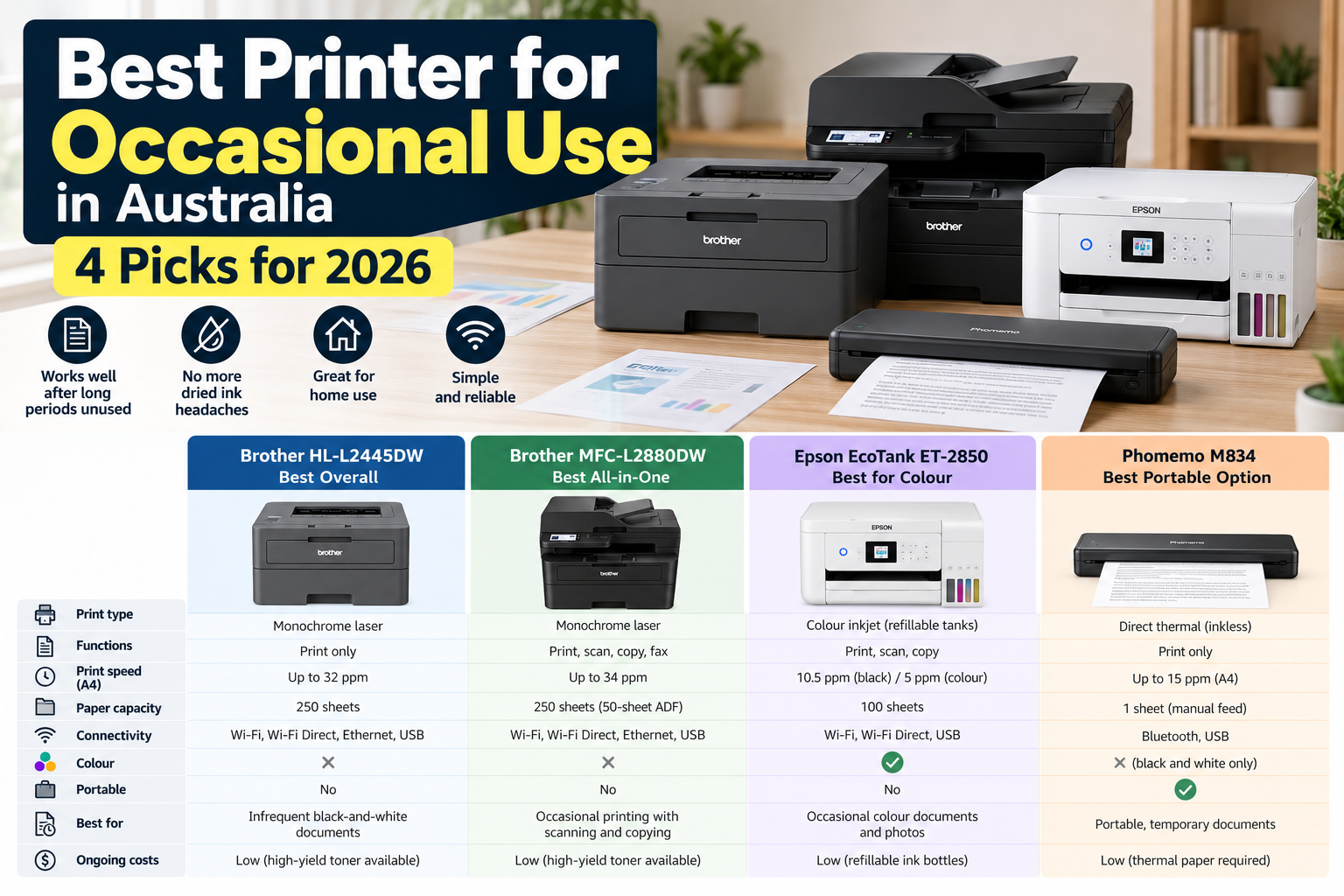
| Printer | Best for | Why |
| Brother HL-L2445DW | Best overall | Simple mono laser, no liquid ink, fast printing and large paper tray |
| Brother MFC-L2880DW | Best all-in-one | Laser printing plus scanning, copying, fax and document feeder |
| Epson EcoTank ET-2850 | Best if you need colour | Colour printing, scanning and refillable ink tanks |
| Phomemo M834 | Best portable option | Battery-powered thermal printing with no ink or toner |
Our short answer: if you mainly print black-and-white documents and might leave the printer unused for weeks, we’d start with a monochrome laser printer.
If colour is essential, an inkjet or EcoTank model is more suitable, but we’d still try to print periodically rather than leaving it completely unused for months.
1. Brother HL-L2445DW – Best Overall for Occasional Use
Best for: people who mainly print black-and-white documents and want a printer that can sit unused without worrying about liquid ink drying in the printhead.
The Brother HL-L2445DW is the type of printer we’d consider first for infrequent home printing.
It is a monochrome laser printer, so it uses toner rather than liquid ink.
Brother lists print speeds of up to 32 A4 pages per minute, automatic two-sided printing, Wi-Fi, Wi-Fi Direct, Ethernet and USB connectivity.
It also has a 250-sheet paper tray, meaning you can leave standard A4 paper loaded rather than feeding sheets manually every time you need to print something.
Why we like it
- Laser toner doesn’t have the same drying problem as liquid ink
- Up to 32ppm A4 printing
- Automatic duplex printing
- 250-sheet paper tray
- Wi-Fi, Wi-Fi Direct, Ethernet and USB
- Works with ordinary office paper
- High-yield replacement toner options available
What to consider
The main limitation is colour.
The HL-L2445DW is a monochrome printer, so it’s excellent for forms, letters, invoices, school notes and ordinary documents but not suitable for colour photos or projects.
It also only prints. If you need scanning and copying, look at the MFC-L2880DW below.
Our view: for someone who might print a few pages and then not touch the printer for several weeks, this is the type of printer we’d choose first.
Check the Brother HL-L2445DW on Amazon Australia
2. Brother MFC-L2880DW – Best All-in-One for Occasional Use
Best for: households and home offices that print infrequently but still need scanning, copying or fax capability.
The MFC-L2880DW uses the same basic advantage as the simpler Brother model above: it’s a monochrome laser printer rather than an inkjet.
But this model adds:
- scanning
- copying
- fax
- 50-sheet automatic document feeder
- automatic two-sided printing and scanning
- 3.5-inch colour touchscreen
Brother rates it at up to 34 A4 pages per minute and provides a 250-sheet main paper tray.
That makes it much more capable if you occasionally need to scan a stack of paperwork, copy documents or use the printer for home-office administration.
Why we’d choose it
You get the convenience of an all-in-one without depending on liquid ink.
For someone who only uses a printer when tax time arrives, paperwork needs signing or an occasional form needs scanning, that can be a very practical combination.
What to consider
It’s considerably larger than a basic print-only model.
If you’re never going to use the scanner, copier or document feeder, paying for those features doesn’t make much sense.
For simple occasional printing, we’d choose the HL-L2445DW instead.
Check the Brother MFC-L2880DW on Amazon Australia
3. Epson EcoTank ET-2850 – Best Occasional Printer if You Need Colour
Best for: households that need colour documents, school projects or occasional photos and cannot use a monochrome laser printer.
This is where the decision becomes more complicated.
Laser is attractive for infrequent printing, but a monochrome laser obviously cannot print colour.
The Epson EcoTank ET-2850 is a refillable ink-tank printer with:
- colour printing
- scanning
- copying
- Wi-Fi
- Wi-Fi Direct
- automatic two-sided printing
- 100-sheet paper capacity
Epson lists ISO print speeds of 10.5ppm for black and 5ppm for colour.
The refillable tank design also avoids constantly replacing small cartridges.
But there’s an important catch
It is still an inkjet printer.
Liquid ink passes through very small printhead nozzles.
If an inkjet sits unused for extended periods, those nozzles can become clogged and may require a nozzle check or printhead cleaning.
So if your definition of occasional use means:
“I print something every few weeks” — an ink-tank model can still be reasonable.
If it means:
“I might not touch my printer for six months” — we’d be more comfortable with laser for ordinary documents.
Who should choose the EcoTank?
Choose it when colour matters enough that a monochrome laser isn’t an option.
We’d still print a small colour document periodically rather than leaving an inkjet completely unused for extended periods.
If colour printing is essential, the ET-2850 is still worth considering where available, but we’d use it periodically rather than leaving it completely unused for very long periods.
4. Phomemo M834 – Best Portable Printer for Occasional Use
Best for: people who rarely print, want something compact and mainly need temporary black-and-white documents.
The Phomemo M834 solves the occasional-use problem in a completely different way.
It uses direct thermal printing, so there is no ink or toner inside the printer at all.
Phomemo lists 300dpi resolution, a 2600mAh rechargeable battery and support for A4, Letter and several narrower thermal-paper sizes.
It also supports Bluetooth printing from mobile devices and USB printing from computers.
That means you can store the printer away and pull it out when needed without worrying about an ink cartridge drying out.
Read our full Phomemo M834 printer review for a closer look at its specifications and limitations.
Check the Phomemo M834 on Amazon Australia
The downside
The printer requires thermal paper rather than standard untreated copy paper.
Thermal output is also not the best option for documents you need to preserve for many years.
The National Archives of Australia warns that thermal paper is not suitable for records of permanent or long-term value because the image can deteriorate over time.
For temporary forms, study notes, travel documents and reference copies, that may be perfectly acceptable.
For certificates, contracts and important financial or legal records, we’d use a conventional printer instead.
Our guide to the best A4 thermal printer paper in Australia explains the paper requirements in more detail.
Why Laser Printers Make Sense for Infrequent Printing
The main reason is simple: toner is already dry.
A laser printer uses powdered toner rather than liquid ink.
That means leaving the printer unused doesn’t create the same drying problem you can encounter with an inkjet printhead.
This doesn’t mean laser printers are maintenance-free.
Toner cartridges eventually need replacing and printers still contain drums, rollers and other components.
But for a household that prints irregularly, toner is generally a much better match than liquid ink.
If you’re trying to understand the wider differences, our thermal printer vs laser printer comparison covers paper costs, speed, portability and document lifespan.
Why Inkjet Printers Can Be Frustrating When Rarely Used
Inkjet printers spray microscopic droplets of liquid ink through tiny nozzles.
If those nozzles become partially blocked, print quality can deteriorate.
You may see:
- missing lines
- faded colours
- banding
- incorrect colours
- blank sections of the page
Cleaning cycles can often fix the problem, but they also use ink.
If you already own an inkjet and want to reduce the risk of dried ink and clogged nozzles, see our guide on how often you should use an inkjet printer and the simple maintenance routine we recommend.
This doesn’t mean you should never buy an inkjet if you print occasionally.
It means an inkjet makes the most sense when you genuinely need its advantages — particularly colour and photo printing.
What About Cheap Cartridge Inkjet Printers?
We’d be cautious about choosing a very cheap cartridge inkjet purely because the purchase price is low.
If you print regularly, a cheap inkjet can be perfectly useful.
But for someone who prints only a few times each year, replacing dried or depleted cartridges can make the initially cheap printer feel much less economical.
Look at the long-term consumables and how frequently you realistically expect to print.
Laser vs Inkjet vs Thermal for Occasional Use
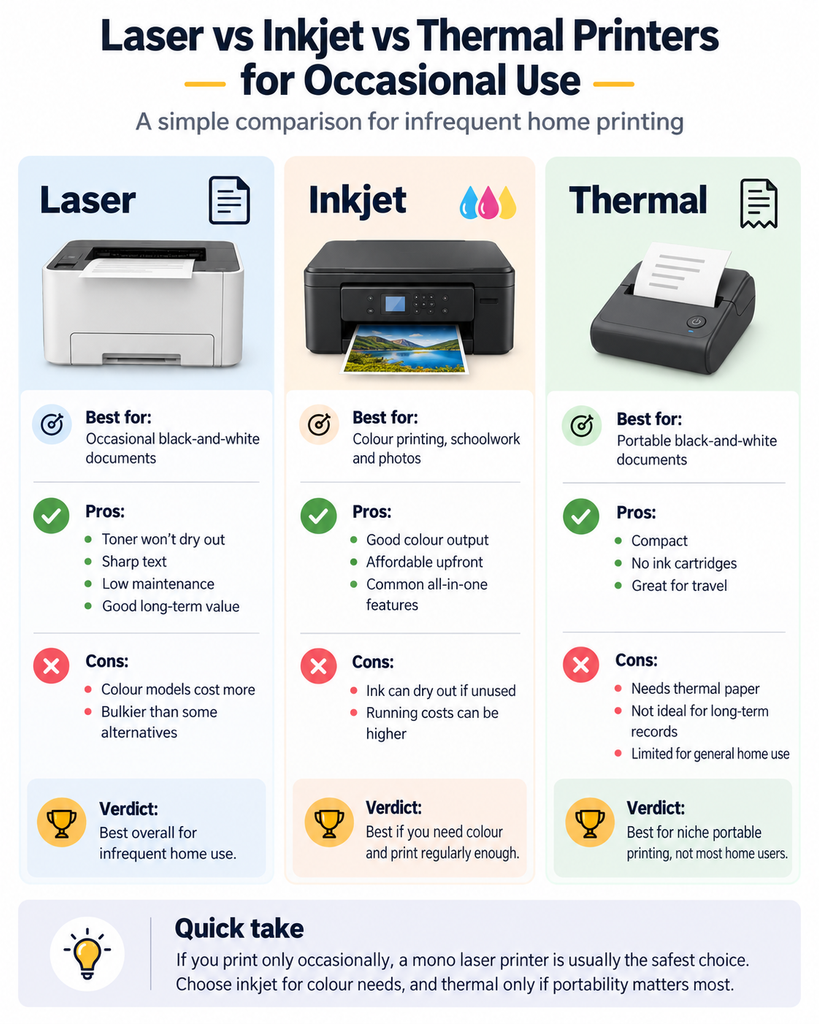
| Feature | Laser | Inkjet | Thermal |
| Good after long periods unused | Excellent | More maintenance risk | Excellent |
| Standard A4 paper | Yes | Yes | No – thermal paper required |
| Colour | Available on colour laser models | Excellent | Usually black and white |
| Photos | Not ideal | Best option | No |
| Portable models | Rare | Some | Excellent |
| Long-term documents | Good | Good | Not recommended for archival use |
| Best occasional-use scenario | Normal home documents | Colour and photos | Portable temporary documents |
How Often Is “Occasional Use”?
There isn’t an official definition.
For this guide, we’re talking about people who may print only a few pages every couple of weeks or sometimes go several weeks between print jobs.
If you print several times every week, inkjet maintenance becomes less of a concern because ink is regularly moving through the system.
If your printer might sit untouched for months, laser becomes much more attractive.
Best Printer for Occasional Home Use
For a typical home that mainly prints:
- forms
- letters
- school worksheets
- shipping labels on A4 paper
- government paperwork
- occasional invoices
we’d choose a basic monochrome laser printer.
You don’t need to spend extra money on colour if virtually everything you print is text.
If your household also prints photographs, colour school projects or graphics, an inkjet becomes easier to justify.
Best Printer if You Print Only a Few Times a Year
If you genuinely print only a handful of times per year, ask yourself whether you need to own a conventional printer at all.
If you do, we’d strongly lean toward laser for normal A4 documents.
A small thermal printer can also make sense when the documents are temporary and portability is useful.
We’ve covered that question more broadly in our guide to whether inkless printers are worth it.
Should You Buy a Colour Laser Printer Instead?
A colour laser avoids much of the liquid-ink issue while still producing colour documents.
The downside is cost and size.
Colour laser printers generally cost more than basic monochrome models and require multiple toner cartridges.
If you only need colour once or twice per year, we’d question whether the additional expense is worthwhile.
If you regularly need colour business documents but still print irregularly, however, colour laser is worth considering.
What Should You Look for in a Printer for Occasional Use?
1. Toner or ink type
If you don’t need colour, toner is usually the easiest choice for long periods between printing.
2. Duplex printing
Automatic two-sided printing is convenient and reduces paper use.
3. Wi-Fi support
A printer that sits unused most of the time should still be easy to access when you suddenly need it.
4. Paper tray capacity
A covered tray is more convenient than manually loading paper for every job.
5. Scanner requirement
Don’t pay extra for an all-in-one printer if you never scan or copy documents.
6. Colour requirement
This single question often determines whether laser or inkjet makes more sense.
7. Document lifespan
If your printed documents need to last for years, standard laser or inkjet output is more appropriate than direct thermal printing.
Which Printer Would We Buy?
For most people searching for the best printer for occasional use, we’d buy a basic monochrome laser printer.
The Brother HL-L2445DW is the type of model we’d start with because it keeps things simple: toner, standard A4 paper, wireless printing, automatic duplex and a large paper tray.
If scanning and copying are important, we’d step up to the Brother MFC-L2880DW.
If colour is essential, we’d consider an EcoTank-style inkjet such as the Epson ET-2850 but make sure it is used periodically rather than abandoned for months at a time.
If maximum portability matters and the documents are temporary, the Phomemo M834 provides a completely different solution.
Frequently Asked Questions
What is the best printer for occasional use?
For most people who mainly print black-and-white documents, we’d choose a monochrome laser printer because toner doesn’t have the same drying problem as liquid ink.
What is the best printer that doesn’t dry out?
The best printer that doesn’t dry out is generally a laser printer because it uses dry toner instead of liquid ink.
For occasional home printing in Australia, the Brother HL-L2445DW is our top choice for black-and-white documents. Its toner won’t dry out during long periods of inactivity.
If you need scanning and copying, the Brother MFC-L2880DW is another practical option. For colour documents, consider a colour laser printer to avoid the drying issues associated with inkjet printheads.
Is laser or inkjet better for infrequent use?
Laser is generally better if you don’t need colour or photo printing. Inkjet makes more sense when colour quality is important, but inkjet printheads can require cleaning if nozzles become blocked.
Can a laser printer sit unused for months?
Toner is a dry powder and does not evaporate like liquid ink. That makes laser printers particularly suitable for long gaps between print jobs, although the printer should still be stored in suitable conditions.
Does printer ink dry out if you don’t print often?
Liquid ink can dry in printhead nozzles during extended periods of inactivity. This can lead to clogged nozzles, streaked output or missing sections of a page.
Should I buy an ink tank printer if I rarely print?
It can work if you need colour and still use the printer periodically. If you might leave the printer completely unused for several months, we’d prefer laser for ordinary documents.
Is a thermal printer good for occasional home use?
It can be useful for temporary black-and-white documents, particularly when portability matters. However, it requires thermal paper and isn’t our first choice for documents that need long-term storage.
What if I only print once or twice a month?
A monochrome laser printer is an excellent fit if most of your printing is ordinary text. If you need colour, an inkjet can still work, particularly if you print often enough to keep the printer operating normally.
Do I need an all-in-one printer?
Only if you regularly need scanning or copying. Otherwise, a simpler print-only laser printer is usually smaller and cheaper.
Sources and Further Reading
- Brother Australia – HL-L2445DW Mono Laser Printer
- Brother Australia – MFC-L2880DW Mono Laser Multi-Function Printer
- Epson Australia – EcoTank ET-2850
- HP – How Long Printer Ink Lasts When You Don’t Print Often
- National Archives of Australia – Managing Records on Thermal Papers
- Phomemo Australia – M834 Portable Thermal Printer
- WorkTechScout – Thermal Printer vs Laser Printer
- WorkTechScout – Are Inkless Printers Worth It?
- WorkTechScout – Best Inkless A4 Printers in Australia
- WorkTechScout – Phomemo M834 Printer Review Australia
- WorkTechScout – Best A4 Thermal Printer Paper Australia
Printer specifications and availability can change. Check the manufacturer’s latest information before purchasing.