Disclosure: This article may contain affiliate links. As an Amazon Associate I earn from qualifying purchases.
Editorial note: This guide is based on current manufacturer specifications, retailer information and publicly available product documentation. We have not conducted hands-on laboratory testing of every printer listed. Product availability and specifications can change.
If you work from a vehicle and regularly need to print invoices, quotes, forms or other documents, carrying a portable printer for car use can save you from having to return to the office.
The best option depends on what you actually print. A mobile inkjet gives you normal A4 paper and colour, while a direct thermal printer eliminates ink cartridges and can be much easier to carry between jobs.
For this guide, we’ve compared five portable printers that make sense for Australian mobile workers, including tradies, field technicians, sales staff, inspectors and small-business owners.
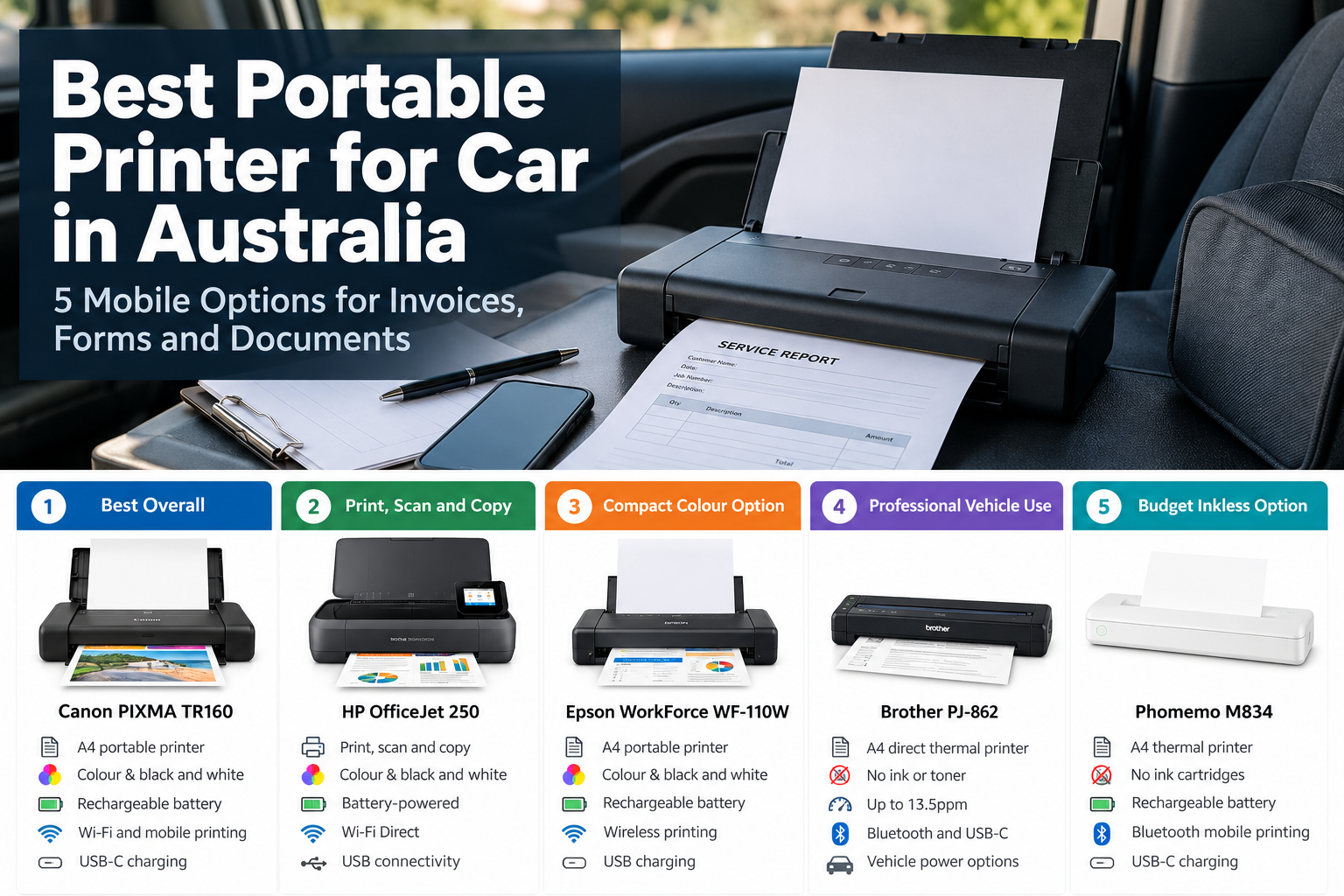
Best Portable Printer for Car: Quick Picks
| Printer | Best for | Printing type |
| Canon PIXMA TR160 | Best overall | Colour inkjet |
| HP OfficeJet 250 | Print, scan and copy | Colour inkjet |
| Epson WorkForce WF-110W | Compact colour printing | Colour inkjet |
| Brother PJ-862 | Professional vehicle use | Direct thermal |
| Phomemo M834 | Budget inkless printing | Direct thermal |
1. Canon PIXMA TR160 – Best Overall
The Canon PIXMA TR160 is our first choice for most people who want a conventional portable printer for car use.
Unlike an inkless thermal printer, it prints on ordinary paper and can produce both black-and-white and colour documents.
Canon positions the TR160 specifically as a portable document printer for people working away from a desk. It supports A4 printing, Wi-Fi connectivity and USB charging.
The rechargeable battery is a major advantage for mobile workers because you don’t need to find a mains power outlet every time you need to print.
Canon states that a new fully charged battery can provide up to 330 pages under its test conditions.
It also supports storing up to five custom templates in the printer, which could be particularly useful if you repeatedly print the same forms, contracts or job documents.
Why we like it
- Prints on normal A4 paper
- Colour and black-and-white printing
- Rechargeable battery
- Wi-Fi and mobile printing
- USB-C charging
- Compact enough for mobile work
- Useful stored-template feature for repeated forms
What to consider
Because the TR160 is an inkjet printer, you’ll still need to carry and replace ink cartridges.
That makes it less maintenance-free than a direct thermal printer, particularly if you only print occasionally.
However, for people who want documents to look and feel like conventional office prints, we think that trade-off makes sense.
Check the Canon PIXMA TR160 on Amazon
2. HP OfficeJet 250 Mobile All-in-One – Best for Print, Scan and Copy
The HP OfficeJet 250 stands out because it isn’t just a printer.
It’s a portable all-in-one that can print, scan and copy, which makes it more suitable for mobile workers who deal with paperwork at customer sites.
If scanning paperwork is just as important as printing, see our guide to the best portable printer and scanner for true mobile all-in-ones and compact two-device setups.
For example, you might need to print a form, scan a signed document and retain a digital copy without returning to the office.
HP supports battery-powered operation, Wi-Fi Direct and USB connectivity. It also supports A4 paper and colour printing.
The major downside is size and weight. At around 3kg with its battery, it is considerably heavier than the small thermal printers in this guide.
For a vehicle-based setup, however, that may matter less than it would for someone carrying the printer around in a backpack all day.
Why we like it
- Print, scan and copy
- A4 colour printing
- Battery-powered operation
- Wi-Fi Direct
- USB connectivity
- Good fit for mobile offices
What to consider
It’s relatively large and heavy for a mobile printer.
It also uses ink cartridges, so there is more to maintain than with an inkless thermal printer.
If scanning and copying aren’t important, a smaller single-function model may be easier to keep in your vehicle.
Check the HP OfficeJet 250 on Amazon
3. Epson WorkForce WF-110W – Best Compact Colour Option
The Epson WorkForce WF-110W is another option for people who want conventional A4 documents without carrying a full-size printer.
It is a single-function colour inkjet with an integrated rechargeable battery, wireless connectivity and support for USB charging.
Epson specifies around 50 pages from the built-in battery under its test conditions, with an optional external battery available for substantially longer mobile use.
It weighs approximately 1.6kg, making it considerably easier to carry than the HP OfficeJet 250.
That combination makes the WF-110W particularly attractive if you move between your car and customer locations rather than leaving the printer permanently inside the vehicle.
Why we like it
- Compact A4 design
- Colour inkjet printing
- Integrated rechargeable battery
- Wireless printing
- USB charging
- Optional external battery
What to consider
The battery capacity is more suited to occasional mobile jobs than very high-volume printing.
As with the Canon and HP, you also have ink cartridges to maintain.
If your priority is simply printing black-and-white job sheets or invoices without ink, a thermal model may suit you better.
Check the Epson WorkForce WF-110W on Amazon
4. Brother PJ-862 – Best Professional Vehicle Printer
The Brother PJ-862 is the most vehicle-focused printer in this comparison.
Rather than being a consumer travel printer that happens to work from a car, Brother’s PocketJet range is designed around professional mobile printing.
The PJ-862 is a direct thermal A4 printer, so it doesn’t require ink cartridges, toner or ribbons.
Brother specifies print speeds up to 13.5 pages per minute, Bluetooth, NFC and USB-C connectivity.
More importantly for this guide, Brother offers dedicated vehicle power accessories for the PJ-862, including a cigarette-socket car adapter and a permanently wired vehicle adapter.
Brother also lists a rechargeable battery and vehicle mounting accessories for its mobile printer ecosystem.
That makes the PJ-862 particularly appealing for technicians, emergency services, transport operators, inspectors and other workers who treat their vehicle as a mobile office.
Why we like it
- Designed for professional mobile printing
- A4 direct thermal printing
- No ink or toner
- Up to 13.5ppm
- Bluetooth and USB-C
- Dedicated vehicle power options
- Compact and lightweight
What to consider
The major limitation is thermal paper.
You cannot simply load ordinary A4 copy paper into a direct thermal printer. You need compatible heat-sensitive media.
Thermal printing is also black and white, and documents that need to remain readable for many years may be better produced with a conventional inkjet or laser printer.
We couldn’t find the exact PJ-862 on Amazon Australia when preparing this guide, so we have not linked to an unrelated substitute.
View the Brother PJ-862 at Brother Australia
5. Phomemo M834 – Best Budget Inkless Option
The Phomemo M834 provides a less expensive way to get into portable A4 thermal printing.
It supports A4 and Letter paper as well as several narrower thermal-paper widths, making it more flexible than many basic portable thermal printers.
Phomemo lists a 2600mAh rechargeable battery, 300dpi printing and USB-C charging.
At around 690g, it is also substantially lighter than the portable inkjet options above.
For occasional black-and-white forms, job sheets, invoices and other temporary business documents, that portability can be very useful.
It is especially attractive if you dislike the idea of keeping ink cartridges in a vehicle.
Why we like it
- No ink cartridges or toner
- A4 thermal printing
- 300dpi
- Rechargeable battery
- Bluetooth mobile printing
- USB support
- Compact and lightweight
What to consider
You need compatible thermal paper, and output is black and white.
Thermal paper also requires more care when storing documents because heat, sunlight and long-term storage conditions can affect the printed image.
For more detail on this model, read our Phomemo M834 printer review.
Check the Phomemo M834 on Amazon
Portable Printer for Car Comparison
| Model | Type | Colour | Battery | Best use |
| Canon PIXMA TR160 | Inkjet | Yes | Rechargeable | Best overall mobile documents |
| HP OfficeJet 250 | Inkjet | Yes | Battery operation | Print, scan and copy |
| Epson WorkForce WF-110W | Inkjet | Yes | Rechargeable | Compact colour printing |
| Brother PJ-862 | Direct thermal | No | Rechargeable / vehicle power | Professional vehicle work |
| Phomemo M834 | Direct thermal | No | Rechargeable | Budget inkless printing |
Inkjet vs Thermal Printer for a Car
This is probably the biggest decision when choosing a portable printer for car use.
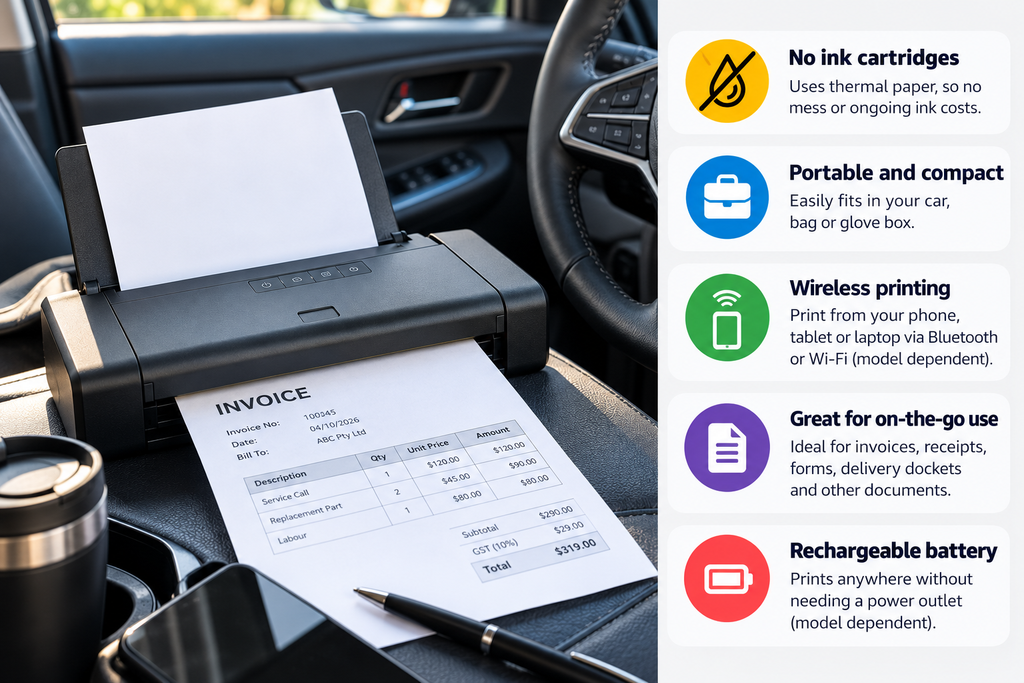
Choose an inkjet if:
- You want to print on ordinary A4 paper
- You need colour
- You want documents that resemble normal office prints
- You may print customer-facing proposals or presentations
- You need scanning or copying, in the case of the HP OfficeJet 250
Choose a thermal printer if:
- You mainly print black-and-white documents
- You want to avoid ink cartridges
- Low weight and compact storage are important
- You print job sheets, forms or temporary documents
- You want something simple for mobile work
For a broader comparison, see our guide to thermal printers vs laser printers.
Can You Keep a Printer Permanently in Your Car?
We wouldn’t automatically leave any portable printer permanently inside a parked car.
Vehicle interiors can become extremely hot, particularly during Australian summer conditions. Batteries, ink, electronics and thermal paper all have recommended operating and storage conditions.
If possible, store the printer in a protective case and take it indoors when the vehicle will be parked in extreme heat for long periods.
Don’t assume that because a printer is marketed as portable or mobile it is designed to sit inside a hot parked vehicle all day.
The Brother PJ-862 is the strongest option in this guide for a more permanent professional vehicle setup because Brother specifically supports vehicle power accessories and lists operating conditions for its car adapters.
How Do You Power a Printer in a Car?
For occasional use, the easiest option is usually a printer with its own rechargeable battery.
You charge it before leaving home or the office and print without connecting it to the vehicle every time.
Some models can also be charged over USB, although charging speed will depend on the printer and power source.
The Brother PJ-862 goes further by supporting dedicated 12V vehicle adapters, including cigarette-socket and permanently wired options.
Before connecting any printer to a generic inverter or USB adapter, check the manufacturer’s voltage, current and charging requirements.
What Should You Print From a Vehicle?
A mobile printer can be useful for:
- Invoices
- Quotes
- Work orders
- Inspection forms
- Customer receipts
- Contracts
- Delivery paperwork
- Service reports
- Site documents
- Temporary labels or information sheets
If invoices are your main reason for buying one, see our separate guide to the best portable invoice printer in Australia. That guide looks more closely at invoice and business-document printing rather than vehicle use specifically.
What to Look for in a Portable Printer for Your Car
1. Battery life
A printer isn’t particularly mobile if you constantly need a power point.
Consider how many pages you realistically print during a normal working day rather than choosing purely based on the largest advertised battery figure.
2. Paper type
This is easy to overlook.
Inkjet models generally use normal office paper, while direct thermal models require compatible thermal media.
If you choose thermal, make sure replacement paper is easy to buy before committing to the printer.
Our guide to the best A4 thermal printer paper in Australia explains the difference between sheets, rolls and printer compatibility.
3. Size and weight
If the printer stays in your boot, weight may not matter much.
If you’re carrying it into homes, job sites or customer offices several times a day, a difference of one or two kilograms becomes much more noticeable.
4. Connectivity
Bluetooth and Wi-Fi Direct can be useful because you may not have access to a normal Wi-Fi network while sitting in a vehicle.
USB support is also valuable as a backup when wireless printing isn’t convenient.
5. Colour
Don’t pay for a colour mobile inkjet if everything you print is a black-and-white invoice or service sheet.
On the other hand, thermal printers are unsuitable if colour logos, charts or photographs matter to your work.
6. Scanning
If clients sign documents on paper and you need to retain copies, the HP OfficeJet 250’s scanner could justify carrying the extra weight.
For printing only, the other models are easier to transport.
Who Should Buy a Portable Car Printer?
A portable printer makes the most sense when printing is a regular part of your work and returning to an office would waste time.
Potential users include:
- Tradies
- Field-service technicians
- Inspectors
- Mobile sales representatives
- Real-estate professionals
- Transport and delivery workers
- Healthcare and community workers
- Event staff
- Small-business owners working from vehicles
If you only need a printed document once every few months, buying a dedicated mobile printer may not be worthwhile.
Which Portable Printer for Car Use Would We Choose?
For most users, we’d choose the Canon PIXMA TR160.
It provides the familiar advantages of normal A4 paper and colour printing while still offering genuine battery-powered portability.
If you also need scanning and copying, the HP OfficeJet 250 is the more complete mobile-office solution.
For professional vehicle installations and frequent black-and-white business documents, the Brother PJ-862 is particularly convincing because of its dedicated vehicle-power options.
If keeping cost, weight and maintenance low matters most, the Phomemo M834 is the thermal option we’d consider first.
Frequently Asked Questions
What is the best portable printer for a car?
For most users, we think the Canon PIXMA TR160 offers the best balance of A4 printing, colour output, battery power and portability. Professional vehicle users who only need black-and-white documents may prefer the Brother PJ-862.
Can I run a printer from a car battery?
Some printers support vehicle power, but you should only use an adapter that meets the manufacturer’s electrical requirements. Brother sells dedicated 12V vehicle adapters for the PJ-862.
Can a portable printer use normal A4 paper?
Portable inkjet models such as the Canon PIXMA TR160, HP OfficeJet 250 and Epson WorkForce WF-110W can use conventional compatible paper. Direct thermal models such as the Brother PJ-862 and Phomemo M834 require compatible thermal paper.
Are thermal printers good for mobile workers?
They can be. Thermal printers remove the need for ink cartridges and are often compact and lightweight. Their main limitations are black-and-white output, specialised paper and the long-term durability of thermal prints.
Should I leave a portable printer in my car?
We wouldn’t leave one exposed to extreme temperatures for long periods. Follow the manufacturer’s operating and storage guidance, protect the printer from direct sunlight and consider taking it indoors when the vehicle will sit in very hot conditions.
Sources and Further Reading
- Canon Australia – PIXMA TR160
- HP – OfficeJet 250 Mobile All-in-One specifications
- Epson – WorkForce WF-110W specifications
- Brother Australia – PJ-862 PocketJet
- Phomemo – M834 Portable Thermal Printer
- WorkTechScout – Best Portable Invoice Printer in Australia
- WorkTechScout – Phomemo M834 Printer Review Australia
- WorkTechScout – Best A4 Thermal Printer Paper Australia
- WorkTechScout – Thermal Printer vs Laser Printer