Disclosure: This article may contain affiliate links. As an Amazon Associate I earn from qualifying purchases.
Editorial note: Printer maintenance varies by brand, model, ink type, temperature and storage conditions. This guide combines current manufacturer guidance with practical advice for typical home inkjet printers.
If your printer often sits unused, you may be wondering how often should you use an inkjet printer to stop the ink drying out or the printhead becoming clogged.
For most home inkjet printers, a practical rule is to print something every one to two weeks.
You do not need to print dozens of pages. A single page containing some black text and a small amount of colour is usually enough to keep ink moving through the printhead.
There is no single schedule that applies to every printer. Some manufacturer guidance is less strict. Canon, for example, recommends printing in black and colour or performing maintenance about once a month on certain models that are left unused for long periods.
So we’d treat every one to two weeks as a sensible preventative routine rather than a strict deadline.
How Often Should You Use an Inkjet Printer?
Short answer: we’d aim to use a home inkjet printer at least once every one to two weeks.
If you regularly go several weeks or months without printing, you may be more likely to encounter:
- missing lines
- faded sections
- incorrect colours
- white streaks
- partially clogged nozzles
- extra printhead cleaning cycles
- ink being used for maintenance rather than actual printing
HP currently recommends printing at least one page every one to two weeks to help keep ink flowing through the nozzles.
Canon’s maintenance guidance for some PIXMA models says that when a printer will not be used for a long time, periodically printing in both black and colour — or performing printhead maintenance — can help prevent dried ink from blocking the nozzles.
The exact timing can vary, but the principle is the same: inkjet printers generally prefer some regular use.
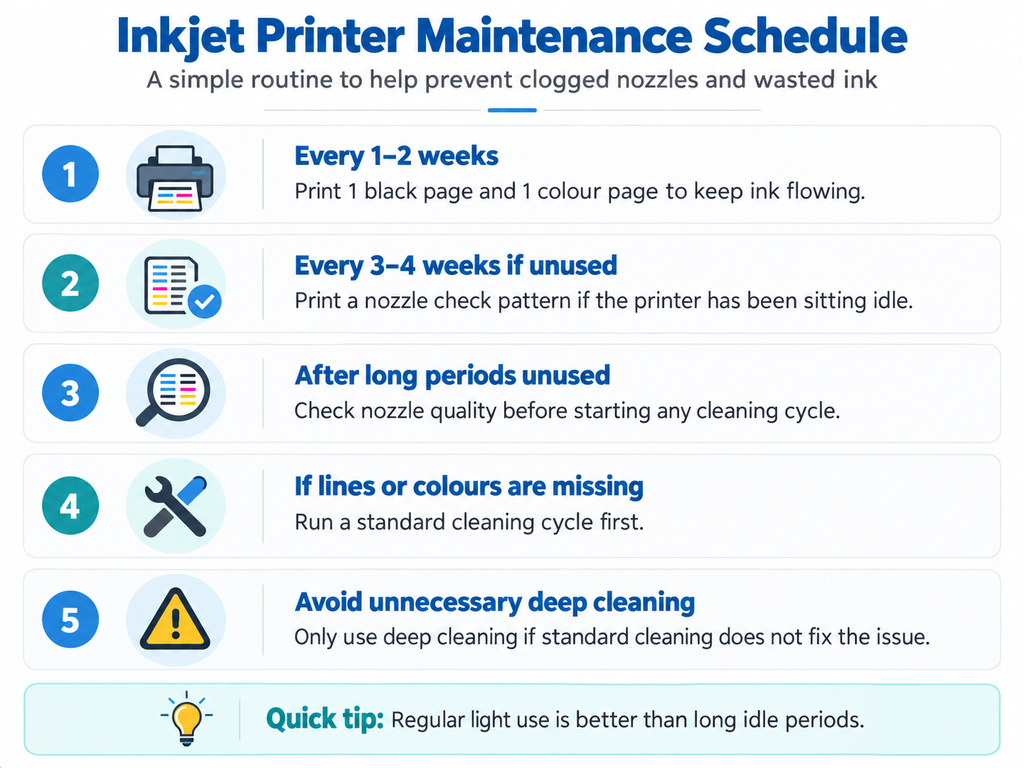
Simple Inkjet Maintenance Schedule
| How often | What we’d do |
| Every 1–2 weeks | Print one small page containing both black text and colour |
| Every 3–4 weeks | If you haven’t printed anything, print a test page or nozzle check |
| After a long period unused | Print a nozzle check before doing unnecessary cleaning |
| If lines or colours are missing | Run the printer’s standard printhead cleaning function |
| If normal cleaning fails | Follow the manufacturer’s model-specific troubleshooting steps before repeatedly using deep cleaning |
The goal isn’t to waste paper and ink on maintenance.
It’s simply to avoid leaving liquid ink sitting completely idle for very long periods.
Why Does Inkjet Ink Dry Out?
Inkjet printers work by pushing microscopic droplets of liquid ink through extremely small printhead nozzles.
Those tiny openings are one reason inkjet printers can produce detailed colour images and photographs.
But liquid ink can also dry around the nozzles when the printer remains unused for extended periods.
If enough dried ink builds up, the nozzle may stop firing properly.
That can result in:
- gaps in text
- horizontal lines through photos
- one colour disappearing
- faded printing
- blank sections of a page
This does not mean every inkjet printer will clog after exactly two weeks.
Humidity, temperature, ink formulation, printer design and how the printer is shut down can all affect how quickly problems appear.
Should You Print in Colour or Is Black Enough?
If you have a colour inkjet printer, we’d occasionally print something containing both black and colour.
Printing only black text may not exercise every colour channel in the printhead.
A simple maintenance page could contain:
- a paragraph of black text
- a small red square
- a blue square
- a green square
- a basic colour photograph
You don’t need a full A4 photograph or a page covered in solid ink.
The objective is simply to use the different ink channels periodically.
Should You Run a Printhead Cleaning Every Week?
No.
We would not run a printhead cleaning cycle every week just as preventative maintenance.
Cleaning cycles use ink.
Epson specifically advises that printhead cleaning is only necessary when output shows signs of blocked nozzles, such as missing dots or lines.
A normal printed page is generally a better preventative measure than repeatedly running cleaning routines when there is nothing wrong.
If your output looks normal, leave the cleaning function alone.
Use a Nozzle Check Before Cleaning
If your printer has been sitting unused and you’re worried that the printhead may be blocked, start with a nozzle check.
Most major inkjet brands provide this function through the printer’s maintenance menu or computer software.
The nozzle-check pattern helps show whether each section of the printhead is firing correctly.
Canon’s guidance, for example, recommends examining the nozzle-check pattern and cleaning the printhead if lines are missing or white streaks appear.
This is better than immediately running several cleaning cycles without knowing whether there is actually a problem.
How Long Can an Inkjet Printer Sit Without Being Used?
There isn’t a universal maximum.
A printer may sit unused for several weeks and work perfectly, while another printer in a hot or dry environment may develop print-quality problems sooner.
Generally:
- A few days: normally no concern.
- One to two weeks: a good point to print a small page if the printer hasn’t been used.
- Several weeks: we’d print a nozzle check or normal colour document.
- Several months: there is a higher chance that cleaning will be required before normal printing resumes.
These are practical guidelines rather than fixed failure points.
If you routinely leave a printer untouched for months, an inkjet may simply be the wrong technology for the way you print.
We’ve compared the alternatives in our guide to the best printer for occasional use in Australia.
Does Printer Ink Dry Out if You Don’t Use It?
It can.
Installed ink is exposed to the printer’s ink-delivery system and printhead, and over long idle periods some ink can dry around the nozzles.
The usual symptoms are not necessarily an empty cartridge.
You might still have ink remaining but see:
- streaks
- missing colours
- broken text
- faded sections
- blank areas
This is one reason someone who prints only a few times per year may find a laser printer easier to live with.
Laser printers use dry toner powder rather than liquid ink, so toner does not have the same drying problem.
Should You Leave an Inkjet Printer Switched On?
You don’t necessarily need to leave your printer permanently powered on.
What matters more is how you switch it off.
Use the printer’s power button or control panel rather than simply cutting power at the wall while the printer is still running.
Epson explains that shutting down from the control panel allows the printhead to move into its protected position, which helps reduce the chance of ink drying in the nozzles.
Canon provides similar guidance on supported models: when the printer is switched off correctly, the printhead is capped to help protect it from drying.
So our rule would be:
Let the printer finish its shutdown process before switching off a power board or unplugging it.
What if You Are Going Away for a Month?
If you know the printer will not be used for several weeks:
- make sure the ink cartridges or tanks are properly installed
- do not remove cartridges just to store them separately unless the manufacturer instructs you to
- print a normal page before leaving
- shut the printer down properly using its power button
- keep it away from unusually hot locations and direct sunlight
When you return, print a nozzle check before assuming the printer needs cleaning.
If the nozzle check looks normal, there is no reason to waste ink on a cleaning cycle.
What if the Printer Hasn’t Been Used for Several Months?
First, don’t panic and don’t immediately run repeated deep-cleaning cycles.
Start with:
- Turn the printer on normally.
- Allow any automatic maintenance to finish.
- Check the ink levels.
- Print a nozzle-check pattern.
- Look for missing lines or colours.
- If needed, run one normal cleaning cycle.
- Print the nozzle check again.
If print quality improves, you’ve probably caught a minor blockage.
If there is no improvement after following the manufacturer’s normal cleaning procedure, check the manual before repeatedly using stronger cleaning options.
Repeated deep cleaning can consume a significant amount of ink.
Signs Your Inkjet Printer Needs Cleaning
Cleaning is more appropriate when you can actually see a problem.
Typical signs include:
- horizontal white lines
- missing sections in a nozzle check
- one colour not printing
- faded output despite adequate ink levels
- broken or incomplete text
- colour shifts that were not present previously
If the printer is producing a clean nozzle check and normal documents, cleaning it again won’t improve anything.
Does an Ink Tank Printer Need Regular Use Too?
Yes.
EcoTank, Smart Tank, MegaTank and similar refillable models are still inkjet printers.
They replace small cartridges with larger refillable reservoirs, but liquid ink still eventually travels through a printhead containing very small nozzles.
So we’d still use an ink-tank printer periodically.
The large ink supply may reduce the cost per page, but it doesn’t turn the printer into a laser printer.
If you’re considering an ink-tank printer mainly for worksheets and schoolwork, see our guide to the best printer for homeschooling in Australia to compare refillable ink-tank and laser options for home learning.
What if You Only Print Once a Month?
Once a month may be fine for some printers, and Canon guidance for certain models specifically suggests printing in black and colour or performing maintenance about monthly during extended periods of non-use.
However, we’d personally use a slightly more conservative schedule of every one to two weeks if avoiding clogging is important to you.
A maintenance print costs very little compared with wasting ink on repeated head-cleaning cycles later.
What if You Only Print a Few Times a Year?
This is where we’d question whether an inkjet printer is the best choice at all.
If you mainly need black-and-white forms, letters, invoices or occasional documents, a monochrome laser printer can be easier for infrequent use because its toner is dry rather than liquid.
If portability is more important than colour and you mostly print temporary documents, a thermal printer is another alternative.
Our best printer for occasional use guide compares laser, inkjet and thermal options specifically for people who do not print regularly.
You can also read our thermal printer vs laser printer comparison if you’re considering moving away from inkjet completely.
Inkjet vs Laser for Infrequent Printing
| Feature | Inkjet | Laser |
| Uses liquid ink | Yes | No |
| Risk of dried nozzles | Possible after long idle periods | No liquid printhead ink to dry |
| Colour/photo printing | Excellent | Usually less suitable for photos |
| Good for rare printing | Requires some maintenance | Usually very good |
| Typical home purchase price | Often lower | Often higher for comparable features |
| Best suited to | Colour, photos and regular home use | Text documents and infrequent printing |
What About Thermal Printers?
Direct thermal printers eliminate liquid ink and toner entirely.
Instead, heat activates a coating on compatible thermal paper.
That means there are no inkjet nozzles to clog.
The trade-off is that most portable thermal printers:
- require specialised thermal paper
- print only in black and white
- are not ideal for long-term archival documents
We’ve covered the technology in more detail in our guide on whether inkless printers are worth it.
If you’re interested in portable A4 models specifically, see our comparison of the best inkless A4 printers in Australia.
7 Ways to Stop Inkjet Ink Drying Out
- Print something every one to two weeks. It only needs to be a small page.
- Use some colour occasionally. Don’t exercise only the black channel.
- Turn the printer off correctly. Use its power button or control panel.
- Don’t run cleaning cycles unnecessarily. Cleaning consumes ink.
- Use the nozzle-check function. Diagnose the problem before cleaning.
- Keep the printer in a normal indoor environment. Avoid excessive heat and direct sunlight.
- Choose a more suitable printer if you rarely print. Laser may make more sense for people who leave a printer unused for months.
Our Recommendation
If you own a normal home inkjet printer, we’d aim to print one small black-and-colour page every one to two weeks.
You don’t need to obsess over an exact date.
If you occasionally stretch that to three or four weeks, it does not mean your printer will suddenly fail.
The goal is simply to avoid repeatedly leaving liquid ink completely stagnant for very long periods.
And if remembering to print a maintenance page feels ridiculous because you only need a printer a few times per year, that is a good sign that you may be better suited to a laser or thermal printer.
Frequently Asked Questions
How often should you use an inkjet printer?
A practical routine is to print at least one page every one to two weeks. Some manufacturers provide less frequent guidance for certain models, so always check the manual for your specific printer.
Do inkjet printers dry out if not used?
Liquid ink can dry around printhead nozzles during extended periods of inactivity, potentially causing missing lines, streaks or faded output.
How often should I print to stop ink cartridges drying out?
For general home use, we’d aim for every one to two weeks. Include some black and colour rather than printing only black text.
Is once a month enough for an inkjet printer?
It may be for some models. Canon guidance for certain printers suggests printing in both black and colour or performing maintenance about once a month during long periods of non-use. A one-to-two-week routine provides a more conservative margin.
Should I clean my printhead every week?
No. Printhead cleaning consumes ink. If your prints and nozzle-check pattern are normal, there is generally no reason to run a cleaning cycle.
Should I turn my inkjet printer off?
Yes, but shut it down using the printer’s own power button or control panel and allow the shutdown process to finish before cutting power at the wall.
What printer is best if I rarely print?
If you mostly print black-and-white documents and may go months between jobs, a monochrome laser printer is often easier to maintain because toner doesn’t have the same liquid-ink drying issue.
Do EcoTank printers dry out?
EcoTank printers are still inkjet printers, so the printhead still contains small nozzles carrying liquid ink. We’d continue to use them periodically even though the ink is stored in refillable tanks rather than cartridges.
Sources and Further Reading
- HP – How Long Does Printer Ink Last If You Don’t Print Often?
- Epson Australia – How to Get the Best Results From Your Epson Printer
- Canon Australia – Keeping the Best Printing Results
- Canon Australia – Printing the Nozzle Check Pattern
- WorkTechScout – Best Printer for Occasional Use in Australia
- WorkTechScout – Thermal Printer vs Laser Printer
- WorkTechScout – Are Inkless Printers Worth It?
- WorkTechScout – Best Inkless A4 Printers in Australia
Printer maintenance procedures vary between manufacturers and models. Check your printer’s current manual before performing cleaning or deep-cleaning procedures.