Disclosure: This article may contain affiliate links. As an Amazon Associate I earn from qualifying purchases.
Editorial note: This guide is based on current manufacturer specifications, retailer information and publicly available product documentation. We have not conducted hands-on laboratory testing of every printer listed. Always confirm that your chosen cardstock or specialty media falls within the printer manufacturer’s supported specifications.
The best printer for greeting cards needs to handle more than ordinary copy paper.
Birthday cards, Christmas cards, thank-you cards and photo cards can involve heavier paper, detailed graphics, photographs, borderless designs and folded layouts.
If you’re selling cards, running costs and consistency become important too. A printer that makes one beautiful card may not be economical when you’re producing hundreds of them.
We’ve compared five options ranging from an affordable refillable home printer to a dedicated 13-inch photo printer for premium card businesses.
Best Printer for Greeting Cards: Quick Picks
| Printer | Best for | Ink system |
| Canon PIXMA PRO-200S | Best overall for premium greeting cards | 8-color dye ink |
| Canon PIXMA TS9521Ca | Best for cardstock & home card making | 5-color cartridge system |
| Epson EcoTank Photo ET-8550 | Best premium refillable option | 6-color refillable system |
| Canon PIXMA G620 | Best for photo greeting cards | 6-color refillable dye ink |
| Epson EcoTank ET-2800 | Best budget option | 4-color refillable system |
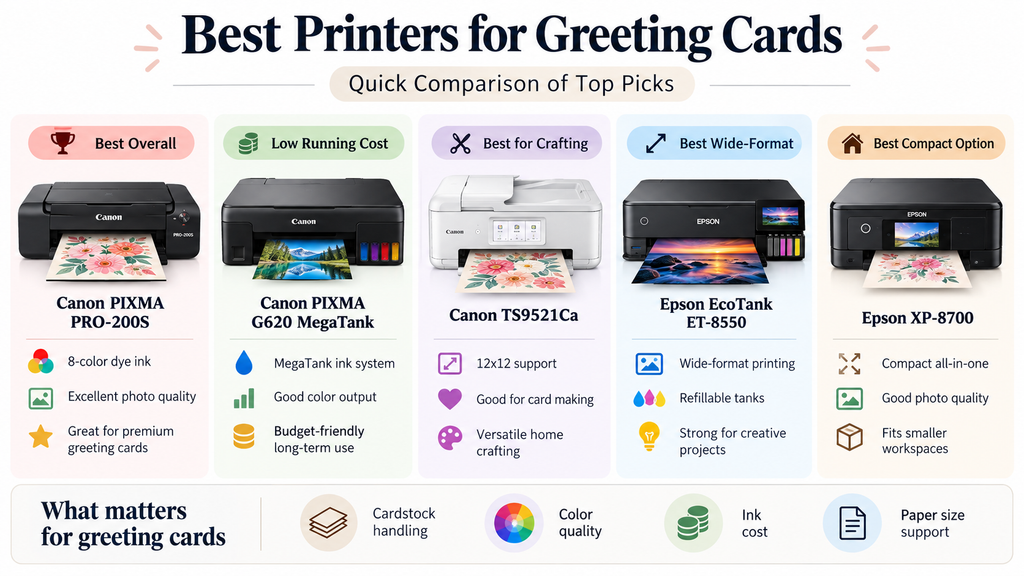
Quick verdict: For premium greeting cards, we’d start with the Canon PIXMA PRO-200S. Its eight-color dye system and wide-format capability make it the strongest option here for detailed artwork, photographs and professional-looking card designs.
For everyday home card making, the Canon PIXMA TS9521Ca is more versatile, while the Epson EcoTank Photo ET-8550 is particularly attractive for people who print cards frequently and want refillable ink.
1. Canon PIXMA PRO-200S – Best Overall Printer for Greeting Cards
The Canon PIXMA PRO-200S is our first choice when finished print quality matters more than getting the lowest possible cost per page.
It uses an eight-color dye-based ink system designed for detailed photographic and creative output.
That makes it particularly suitable for greeting cards containing photographs, illustrations, watercolor designs, gradients and other artwork where color reproduction matters.
The PRO-200S supports borderless printing up to 13 × 19 inches.
That wider format gives card makers flexibility to print larger sheets and trim or fold them into smaller finished cards.
It also includes manual media feeding for compatible specialty papers.
For someone selling premium greeting cards, art cards or photographic cards, that combination makes the PRO-200S the strongest specialist printer in this comparison.
Why we like it
- Eight-color dye ink system
- Strong photo and artwork reproduction
- Up to 13 × 19-inch printing
- Borderless printing
- Manual feed for compatible specialty media
- Wireless connectivity
- Good fit for premium cards
- Useful for small greeting-card businesses
What to consider
The biggest drawback is the cartridge system.
Eight individual inks can become expensive if you’re producing large volumes of lower-priced cards.
The PRO-200S is also a dedicated printer rather than an all-in-one, so there is no scanner or copier.
Its value comes from print quality rather than being the cheapest or most versatile household machine.
Check the Canon PIXMA PRO-200S on Amazon
2. Canon PIXMA TS9521Ca – Best for Cardstock and Home Card Making
The Canon PIXMA TS9521Ca is the more practical choice for people making greeting cards alongside other crafts and everyday household printing.
It supports 12 × 12-inch creative projects and documents up to 11 × 17 inches.
That extra flexibility is useful when you’re working with cards, scrapbook layouts, invitations and other creative paper projects.
The printer includes both front and rear paper feeding, along with scanning and copying.
For card makers who create artwork by hand, digitize photographs or use the same printer for general household work, those extra functions may be more useful than the specialist photo focus of the PRO-200S.
Why we like it
- Supports larger creative media
- 12 × 12-inch craft capability
- Up to 11 × 17-inch document printing
- Front and rear paper feeding
- Print, scan and copy
- Automatic duplex printing
- Wireless connectivity
- Strong all-round home craft option
What to consider
The TS9521Ca uses traditional cartridges rather than refillable bottles.
If you’re printing large numbers of full-color greeting cards, ink cost may become significant.
Also remember that cardstock varies in thickness and stiffness.
Check Canon’s supported media specifications before buying large quantities of heavy paper.
Check the Canon PIXMA TS9521Ca on Amazon
3. Epson EcoTank Photo ET-8550 – Best Premium Refillable Option
The Epson EcoTank Photo ET-8550 is one of the most interesting options for people who make greeting cards regularly.
It combines a six-color photo-oriented ink system with refillable tanks.
That gives it an advantage over traditional cartridge printers when you’re producing a lot of colorful work.
The ET-8550 can print borderless output up to 13 × 19 inches and supports multiple media feeds.
That makes it useful not only for greeting cards, but also for photographs, artwork and other creative products.
It also includes scanning and copying.
For someone running a small creative business and producing several different paper products from one machine, that versatility is valuable.
Why we like it
- Six-color photo-oriented ink system
- Refillable EcoTank bottles
- Up to 13 × 19-inch printing
- Borderless printing
- Multiple paper feeds
- Print, scan and copy
- Strong photo output
- Good for frequent card production
What to consider
The ET-8550 costs considerably more upfront than a basic EcoTank.
If you’re only making a handful of birthday cards each year, you probably won’t get enough value from its larger format and six-color system.
It makes much more sense for frequent creators, photographers or small businesses.
Check the Epson EcoTank Photo ET-8550 on Amazon
4. Canon PIXMA G620 – Best for Photo Greeting Cards
The Canon PIXMA G620 is the option we’d consider for greeting cards that rely heavily on photographs.
It uses a six-color dye-based ink system, including red and gray inks, rather than the basic four-color arrangement found in many inexpensive home printers.
That makes it more photo-focused and particularly useful for family photo cards, Christmas cards, birth announcements and other image-heavy projects.
The G620 also uses refillable MegaTank bottles.
That combination of additional colors and refillable ink can be appealing for people who print photographs regularly but don’t need a larger 13 × 19-inch printer.
Why we like it
- Six-color dye ink system
- Refillable MegaTank bottles
- Strong photo focus
- Print, scan and copy
- Wireless connectivity
- Good for family photo cards
- Useful for Christmas and holiday cards
- More economical ink approach than multi-cartridge photo printers
What to consider
The main limitation is print size.
If you want wide-format card sheets or larger professional art output, the ET-8550 or PRO-200S gives you more room.
For standard-size photographic greeting cards, however, the G620 is a practical middle ground.
Check the Canon PIXMA G620 on Amazon
5. Epson EcoTank ET-2800 – Best Budget Printer for Greeting Cards
The Epson EcoTank ET-2800 is our budget choice for someone who wants to make greeting cards at home without buying a specialist photo printer.
It uses a straightforward four-color refillable ink system and includes scanning and copying.
For simple birthday cards, thank-you cards, children’s cards and basic designs, that may be enough.
The refillable tanks are its biggest attraction.
Full-color card designs can use considerably more ink than everyday text documents, so bottled ink can be useful even for hobbyists.
Why we like it
- Affordable entry point
- Refillable ink tanks
- Color printing
- Print, scan and copy
- Wireless connectivity
- Useful for basic home card making
- Suitable as an everyday household printer
- Low-cost way to start
What to consider
This is not a specialist photo printer.
Its four-color system won’t offer the same photo and gradient capabilities as the PRO-200S, ET-8550 or G620.
It is also best suited to compatible everyday media rather than unusually thick professional card stock.
Check the Epson EcoTank ET-2800 on Amazon
Greeting Card Printer Comparison
| Printer | Ink system | Main strength | Best for |
| Canon PRO-200S | 8-color dye | Premium print quality | Professional greeting cards |
| Canon TS9521Ca | 5-color cartridges | Flexible creative media | Home card making |
| Epson ET-8550 | 6-color refillable | Photo quality + ink economy | Frequent printing / small business |
| Canon G620 | 6-color refillable dye | Photo printing | Photo and holiday cards |
| Epson ET-2800 | 4-color refillable | Budget running costs | Basic DIY cards |
What Type of Printer Is Best for Greeting Cards?
For most greeting-card makers, we’d choose a color inkjet printer.
Inkjet printers are particularly well suited to photographs, illustrations, gradients, decorative backgrounds and other colorful designs.
They also give you a broad range of consumer and professional models designed for creative media.
The right printer depends on whether you’re printing ten birthday cards per year or hundreds of products for a business.
Best Printer for Card Making
For general card making at home, the Canon PIXMA TS9521Ca is our most versatile choice.
Its larger creative formats, multiple feeds, scanning and copying make it useful beyond greeting cards.
If your card making is part of a broader craft hobby involving scrapbook pages and cutting machines, see our guide to the best printer for crafting for more craft-focused options.
Best Printer for Printing Cards on Cardstock
Cardstock handling deserves careful attention because “cardstock” isn’t one standardized thickness.
Two products with similar weight ratings can behave differently because of their coating, stiffness and actual thickness.
Before ordering paper in bulk, check:
- Maximum supported media thickness
- Supported paper weights
- Recommended feed path
- Whether the paper is inkjet compatible
- Supported card dimensions
A rear or manual feed can be particularly helpful for heavier sheets because it may reduce how sharply the material bends through the printer.
Best Home Printer for Greeting Cards
For most households, we’d choose between the Canon TS9521Ca and Epson ET-2800.
The Canon is the more capable creative printer, particularly if you need larger media.
The Epson is the more straightforward budget option if you also need a general-purpose household printer and want refillable ink.
Best Printer for Photo Greeting Cards
Photo greeting cards benefit from a printer designed specifically for image quality.
The Canon G620 is particularly attractive because of its six-color dye system and refillable ink.
The ET-8550 gives you a larger format and additional creative flexibility.
The PRO-200S is the premium option when finished photographic quality is your main priority.
Best Printer for Christmas and Holiday Cards
Holiday cards are often photo-heavy, making the Canon G620 and Epson ET-8550 strong choices.
If you’re producing a large batch every year, ink cost becomes more important than it would for a few occasional birthday cards.
Refillable tank systems can therefore be particularly attractive for seasonal printing.
Before starting a large batch, print a few samples first to check color, paper feed and folding alignment.
Best Printer for a Greeting Card Business
If you’re selling greeting cards, your decision should be based on more than print quality.
You also need to think about production cost, reliability, paper handling and whether your customers will pay enough to justify your equipment.
For premium card businesses, we’d start with the Canon PRO-200S.
For higher volumes where ink consumption matters, the Epson ET-8550 becomes particularly attractive.
Calculate your real cost per finished card, including:
- Ink
- Cardstock
- Envelopes
- Test prints
- Misprints
- Cutting and scoring
- Packaging
- Shipping materials
- Your time
A beautiful printer isn’t useful for a business if every sale leaves almost no profit.
Greeting Cards vs Invitations
Greeting cards and invitations overlap, but they’re not exactly the same printing job.
Greeting cards are commonly folded and may contain photographs, artwork or messages on multiple sides.
Invitations tend to put more emphasis on formal stationery, envelopes, wedding designs and matching event materials.
If wedding stationery is your main goal, see our guide to the best printers for invitations for invitation-specific recommendations.
Greeting Cards vs Art Prints
Art cards can also overlap heavily with fine-art printing.
If you’re selling reproductions of illustrations or paintings on cards, color accuracy and artwork reproduction may matter more than scanning and office features.
For that workflow, see our guide to the best printer for art prints.
Do You Need Borderless Printing for Greeting Cards?
No, but it can be useful.
Borderless printing is helpful when photographs or background artwork need to extend to the edge of the card.
Many greeting-card designs intentionally use white borders, so borderless output shouldn’t be treated as a requirement.
Another approach is to print on a larger sheet and trim the finished card afterward.
What Paper Should You Use for Greeting Cards?
Common options include:
- Smooth matte cardstock
- Glossy photo card
- Satin or luster paper
- Textured creative paper
- Heavy presentation paper
- Inkjet-compatible coated stock
The right choice depends on the design.
Photographic cards may look better on a smoother coated surface, while illustrated or handmade-style cards may suit matte or lightly textured stock.
Always test a small pack before buying large quantities.
Can You Print Folded Greeting Cards at Home?
Yes.
A common method is to print the design on a larger flat sheet, then score and fold it after printing.
For example, a card designed to finish at 5 × 7 inches will require a larger flat sheet before folding.
Check your printer’s supported paper sizes and margins when setting up the design.
A scoring board or scoring tool can also help create cleaner folds on heavier paper.
Ink Tank vs Cartridge Printer for Greeting Cards
Ink-tank printers
Printers such as the ET-8550, G620 and ET-2800 use refillable bottles.
These can be attractive for frequent card makers because full-page graphics and photographs consume much more ink than ordinary text.
Cartridge printers
The PRO-200S and TS9521Ca use cartridges.
The advantage is that these printers offer features or output quality that may justify the higher ink cost.
The right choice depends on whether you prioritize production cost, media flexibility or premium output.
Inkjet vs Laser for Greeting Cards
We’d generally start with inkjet for colorful greeting cards.
Inkjet models offer strong photographic output and a wide range of compatible creative papers.
Laser printers can be useful for sharp text and faster document production, but you must use media specifically designed for laser printing.
Never run inkjet-only coated card through a laser printer simply because it fits in the tray.
Is It Cheaper to Print Your Own Greeting Cards?
It can be, particularly if you already own a suitable printer.
However, remember to include:
- Printer cost
- Ink
- Cardstock
- Envelopes
- Cutting tools
- Scoring tools
- Misprints
- Your time
For very small quantities, buying professionally printed cards may actually be cheaper.
Home printing becomes more attractive when you want complete control, create many different designs or sell cards regularly.
What to Look for in a Greeting Card Printer
1. Cardstock support
Check the manufacturer’s paper specifications rather than relying only on the word “cardstock.”
2. Paper feed
Rear and manual feeds can be useful for compatible heavier creative media.
3. Color quality
Photo cards and detailed illustrations benefit from photo-oriented ink systems.
4. Ink cost
This becomes increasingly important as production volume grows.
5. Print size
Larger printers give you more flexibility for layouts that will be trimmed and folded afterward.
6. Borderless capability
Useful for full-bleed designs but not necessary for every card.
7. Scanner and copier
These can be useful if you digitize hand-drawn artwork or photographs.
Which Greeting Card Printer Would We Choose?
For premium output, we’d choose the Canon PIXMA PRO-200S.
For general home card making, we’d choose the Canon PIXMA TS9521Ca.
For frequent printing and a small creative business, the Epson EcoTank Photo ET-8550 provides an attractive combination of six-color output and refillable ink.
For photo cards, the Canon PIXMA G620 is the standout value option.
And for beginners who mainly want simple DIY greeting cards, the Epson EcoTank ET-2800 is the sensible budget starting point.
Frequently Asked Questions
What is the best printer for greeting cards?
For premium greeting cards, we’d choose the Canon PIXMA PRO-200S because of its eight-color dye ink system and strong creative print quality. For general home use, the Canon TS9521Ca is more versatile.
What is the best home printer for greeting cards?
The Canon PIXMA TS9521Ca is our preferred home option because it combines creative paper handling with scanning, copying and larger-format printing.
What is the best budget printer for greeting cards?
The Epson EcoTank ET-2800 is our budget choice because it uses refillable ink and can also serve as a normal household printer.
What is the best printer for photo greeting cards?
The Canon PIXMA G620 is a strong value choice for photo cards because it uses a six-color refillable dye ink system. The Epson ET-8550 provides more size and media flexibility.
What printer is best for a greeting card business?
The Canon PRO-200S is our choice when premium output matters most. Businesses printing higher volumes may prefer the Epson ET-8550 because of its refillable ink system.
Can a regular printer print greeting cards?
Yes, provided the paper size, weight and thickness fall within the printer’s supported specifications. A standard color inkjet can handle many DIY cards.
Can I print greeting cards on cardstock?
Yes, if your printer supports the exact cardstock you’re using. Check paper thickness, weight, size and feed recommendations before purchasing stock in bulk.
Do I need a special printer for card making?
No. Many normal color inkjets can make greeting cards. Creative or photo-oriented printers become more useful when you need heavier paper handling, better photographic output, wider formats or lower ink costs.