Disclosure: This article may contain affiliate links. As an Amazon Associate I earn from qualifying purchases.
Editorial note: This guide is based on current manufacturer specifications, retailer information and publicly available product documentation. We have not conducted hands-on laboratory testing of every printer listed. Product availability and specifications can change.
The best printer for teachers needs to do more than produce the occasional document.
Teachers may print worksheets, lesson plans, classroom activities, parent letters, study material, labels and colorful learning resources throughout the school year. That makes running costs, paper capacity and reliability just as important as purchase price.
Some teachers mainly need fast black-and-white printing. Others regularly create colorful classroom material and need scanning and copying as well.
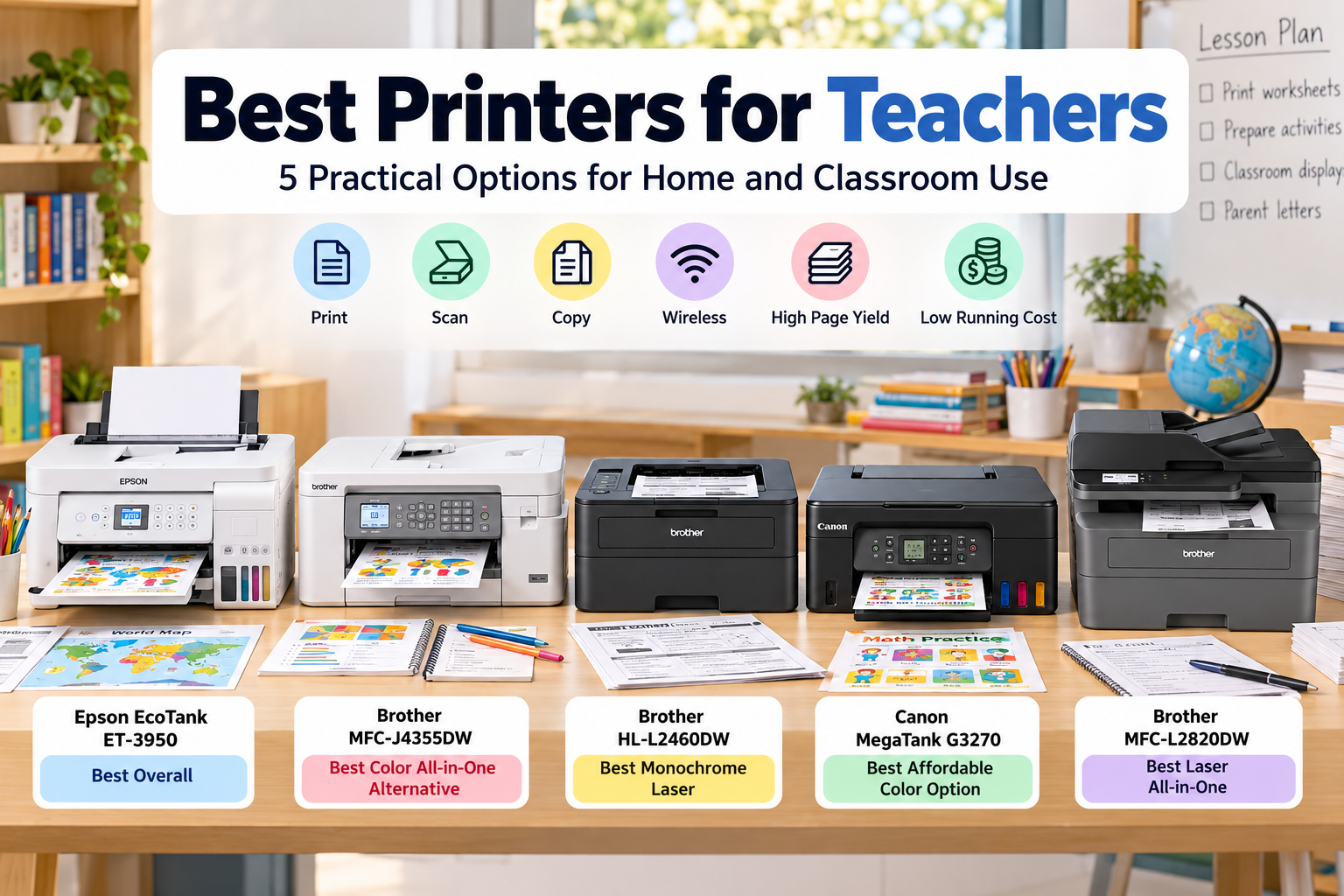
We’ve compared five practical options covering refillable ink-tank printers, color all-in-ones and fast monochrome laser printers for both home and classroom use.
Best Printer for Teachers: Quick Picks
| Printer | Best for | Type |
| Epson EcoTank ET-3950 | Best overall | Color ink-tank all-in-one |
| Brother MFC-J4355DW | Best color all-in-one alternative | Color inkjet all-in-one |
| Brother HL-L2460DW | Best monochrome laser | Black-and-white laser |
| Canon MegaTank G3270 | Best affordable color option | Color ink-tank all-in-one |
| Brother MFC-L2820DW | Best laser all-in-one | Black-and-white laser all-in-one |
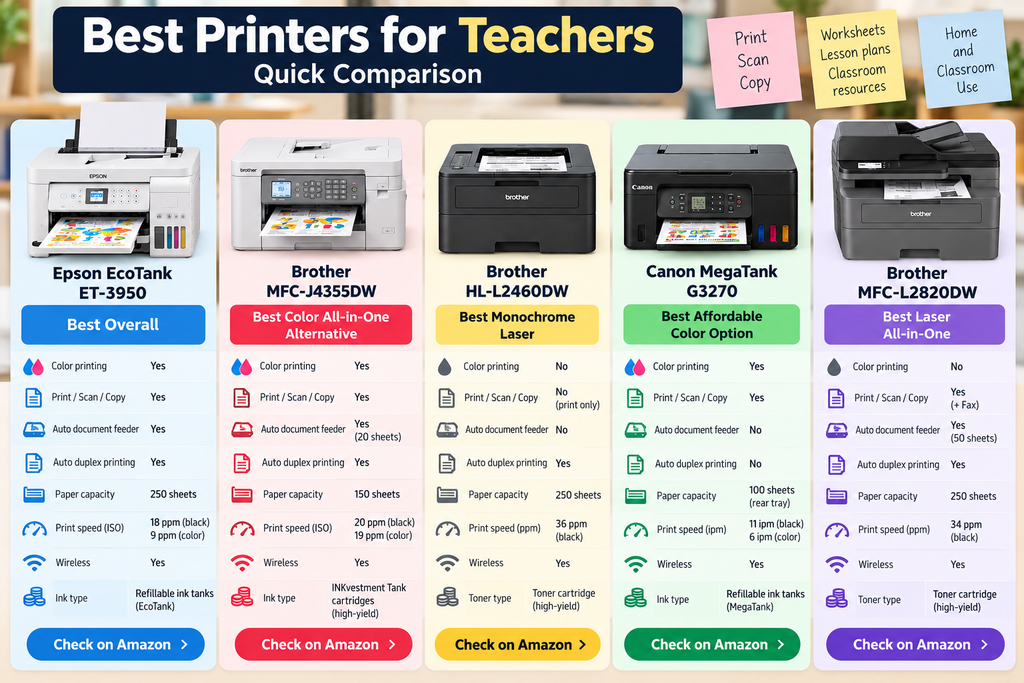
Quick verdict: For most teachers, we’d start with the Epson EcoTank ET-3950. It combines refillable ink tanks, color printing, scanning, copying, automatic document handling and a large paper tray. Teachers who mainly print text-heavy worksheets may be better served by one of the Brother monochrome laser printers.
1. Epson EcoTank ET-3950 – Best Overall Printer for Teachers
The Epson EcoTank ET-3950 is our first choice for teachers who want one printer capable of handling both everyday classroom paperwork and colorful learning material.
Its biggest advantage is the refillable EcoTank ink system. Instead of repeatedly replacing small cartridges, the printer uses larger ink bottles.
That approach can make particular sense for teachers who print regularly throughout the school year.
The ET-3950 can print, scan and copy and includes an automatic document feeder for handling multi-page paperwork.
It also has a 250-sheet paper tray, reducing how often you need to reload paper while preparing a large batch of worksheets.
Epson lists print speeds of up to 18 ISO pages per minute in black and 9 ISO pages per minute in color.
Automatic two-sided printing is another valuable feature because classroom handouts can consume a surprising amount of paper.
Why we like it
- Refillable EcoTank ink system
- Color and black-and-white printing
- Print, scan and copy
- Automatic document feeder
- 250-sheet paper tray
- Automatic two-sided printing
- Automatic duplex scanning
- Wireless and mobile printing
What to consider
The ET-3950 costs more upfront than a basic cartridge printer.
That purchase price makes more sense if you’re actually going to print regularly. Someone producing only a few pages each month may not get as much value from a larger refillable ink system.
For teachers producing worksheets, lesson material, classroom displays and color resources throughout the year, however, we think it offers the best overall balance in this comparison.
Check the Epson EcoTank ET-3950 on Amazon
2. Brother MFC-J4355DW – Best Color All-in-One Alternative
The Brother MFC-J4355DW is a strong alternative for teachers who want fast color printing, scanning and copying without moving to a refillable bottle-based printer.
Brother uses its INKvestment Tank cartridge system here rather than refillable ink bottles.
That distinction is important: this is still a cartridge-based inkjet, although Brother designs the system around higher-yield ink cartridges and longer replacement intervals than a basic entry-level inkjet.
Brother lists print speeds up to 20 pages per minute in black and 19 pages per minute in color, making it one of the faster color printers in this guide.
It includes a 20-page automatic document feeder for scanning and copying multi-page material.
The 150-sheet main paper tray is smaller than the Epson’s 250-sheet tray, but still enough for a substantial batch of classroom documents.
Automatic duplex printing is included as well, which is useful for worksheets and handouts.
Why we like it
- Fast color and black-and-white printing
- Print, scan and copy
- 20-page automatic document feeder
- Automatic duplex printing
- 150-sheet paper tray
- Dual-band wireless connectivity
- Wi-Fi Direct and mobile printing
- Good fit for regular home or classroom use
What to consider
The MFC-J4355DW does not use refillable bottles like an EcoTank or MegaTank printer.
Teachers with extremely high color-printing volumes should therefore compare the ongoing cost of replacement cartridges against refillable ink-tank models before buying.
It also has a smaller paper tray than the Epson ET-3950.
But if speed, automatic document handling and a conventional all-in-one design matter, the Brother is a strong alternative.
Check the Brother MFC-J4355DW on Amazon
3. Brother HL-L2460DW – Best Laser Printer for Teachers
Not every teacher needs color.
If most of your printing consists of worksheets, lesson plans, quizzes, reading material and text-heavy handouts, a monochrome laser printer can make more sense than an inkjet.
The Brother HL-L2460DW is designed around fast black-and-white document printing.
Brother lists print speeds up to 36 pages per minute, making it substantially faster than the color inkjets above for basic document jobs.
It also has a 250-sheet paper tray and automatic duplex printing.
That combination is useful when you suddenly need 30 or 60 copies of a worksheet before class.
Connectivity includes dual-band Wi-Fi, Ethernet, USB and Wi-Fi Direct, along with mobile printing support.
Why we like it
- Fast black-and-white printing
- Up to 36 ppm
- 250-sheet paper tray
- Automatic duplex printing
- Dual-band wireless
- Ethernet and USB
- Toner-based printing
- Excellent fit for text-heavy teaching material
What to consider
This is a monochrome printer.
If you’re producing colorful classroom signs, maps, visual learning resources, photographs or craft material, the HL-L2460DW isn’t the right choice.
It also doesn’t have a built-in scanner or copier.
But if you’re looking for the best laser printer for teachers who mainly care about fast, crisp worksheets and text documents, this is one of the models we’d consider first.
Check the Brother HL-L2460DW on Amazon
4. Canon MegaTank G3270 – Best Affordable Color Option
The Canon MegaTank G3270 is worth considering if you want refillable ink and color printing without paying for every automatic office feature.
Canon’s MegaTank system uses refillable ink bottles instead of conventional cartridges.
The G3270 can print, scan and copy and supports wireless and mobile printing.
Canon lists print speeds of approximately 11 images per minute in black and 6 images per minute in color.
A full set of ink bottles is rated for up to approximately 6,000 black pages or 7,700 color pages under Canon’s standard testing conditions.
It also has a compact design that should be easier to fit into a home workspace than many larger office all-in-ones.
Why we like it
- Refillable MegaTank ink system
- Color printing
- Print, scan and copy
- Wireless connectivity
- Mobile printing
- 100-sheet rear paper tray
- Useful for worksheets and colorful classroom material
- Relatively simple feature set
What to consider
The main compromise is automation.
The G3270 doesn’t include an automatic document feeder, and standard document printing is single-sided rather than automatic duplex.
If you frequently scan stacks of worksheets or produce large quantities of two-sided handouts, the Epson ET-3950 or Brother MFC-J4355DW is more convenient.
For teachers mainly looking for refillable color printing with basic scanning and copying, though, the Canon is easier to justify.
Check the Canon MegaTank G3270 on Amazon
5. Brother MFC-L2820DW – Best Black-and-White Laser All-in-One
The Brother MFC-L2820DW fills the gap between a fast print-only laser and a full multifunction office machine.
It prints, scans, copies and faxes while retaining the speed advantages of monochrome laser printing.
Brother lists print speeds up to 34 pages per minute.
More importantly for teachers dealing with paperwork, it includes a 50-page automatic document feeder.
That can save significant time when scanning or copying a stack of multi-page documents.
It also has a 250-sheet paper tray and automatic duplex printing.
Why we like it
- Fast monochrome laser printing
- Up to 34 ppm
- Print, scan, copy and fax
- 50-page automatic document feeder
- 250-sheet paper tray
- Automatic duplex printing
- Dual-band wireless
- Ethernet and USB connectivity
What to consider
The obvious limitation is the lack of color.
It’s also larger than the Brother HL-L2460DW because of the built-in scanner and document feeder.
But teachers who regularly print, scan and copy black-and-white paperwork may prefer having all those functions in one machine.
Check the Brother MFC-L2820DW on Amazon
Printer Comparison for Teachers
| Printer | Color | Scan / Copy | Auto duplex | Best use |
| Epson EcoTank ET-3950 | Yes | Yes | Yes | Best overall |
| Brother MFC-J4355DW | Yes | Yes | Yes, printing | Fast color all-in-one |
| Brother HL-L2460DW | No | No | Yes | Fast worksheets and text |
| Canon MegaTank G3270 | Yes | Yes | No automatic duplex | Affordable refillable color |
| Brother MFC-L2820DW | No | Yes | Yes | Black-and-white all-in-one |
Ink Tank vs Laser Printer for Teachers
This is probably the biggest decision when choosing a teacher printer.
Choose an ink-tank or color inkjet if:
- You regularly print in color
- You create classroom decorations or visual resources
- You print charts, diagrams or colorful worksheets
- You need scanning and copying
- You want a versatile home-and-school printer
Choose a laser printer if:
- Most of your printing is black and white
- You regularly print large stacks of worksheets
- Fast document printing matters
- You mainly produce text-heavy material
- You don’t need photo or color printing
Neither technology is automatically better for every teacher.
An elementary teacher creating colorful classroom activities may benefit far more from a color ink-tank printer, while someone teaching a subject dominated by text worksheets may prefer laser.
What Is the Best Color Printer for Teachers?
For teachers who need color regularly, we’d start with the Epson EcoTank ET-3950.
It combines refillable ink, scanning, copying, a large paper tray and automatic document-handling features.
The Brother MFC-J4355DW is a strong alternative if you value faster color printing and a traditional cartridge-based all-in-one design.
For a simpler and potentially more affordable refillable option, the Canon MegaTank G3270 is worth comparing.
Teachers creating reward stickers, labels or craft activities can also see our guide to the best printer for sticker making for color inkjet options suited to printable sticker paper and creative projects.
Best Printer for Teachers at Home
A teacher buying a printer for home may have slightly different priorities from someone placing one permanently in a classroom.
At home, size, wireless connectivity and versatility can matter more.
You may also use the printer for personal paperwork, family documents or occasional photos in addition to school material.
For that type of mixed use, we’d favor the Epson ET-3950 or Brother MFC-J4355DW.
If your home printing is almost entirely black-and-white worksheets, the Brother HL-L2460DW is simpler and considerably faster.
Best Printer for a Classroom Teacher
If the printer will actually sit in your classroom, think about workload before anything else.
A teacher printing frequently may benefit from:
- A larger paper tray
- Automatic duplex printing
- Fast print speeds
- Reasonable replacement ink or toner costs
- Reliable wireless connectivity
- An automatic document feeder for scanning and copying
The Epson ET-3950 is our strongest color option for that role.
For high-volume black-and-white worksheets, the Brother HL-L2460DW is faster and simpler.
If scanning and copying are also important, the Brother MFC-L2820DW gives you those functions without giving up laser printing.
What to Look for in a Good Printer for Teachers
1. Running costs
Don’t choose purely by purchase price.
A cheap printer can become expensive if you’re constantly replacing low-capacity cartridges.
Teachers who print regularly should pay particular attention to replacement ink or toner costs and expected page yield.
2. Automatic duplex printing
Printing on both sides of a page can reduce paper use and make large classroom handouts more manageable.
If you expect to print hundreds of worksheets, automatic duplex is a feature we’d strongly prefer.
3. Paper capacity
A small paper tray isn’t a major problem when you’re printing five pages.
It becomes annoying when you’re preparing material for several classes.
A 250-sheet tray can significantly reduce how often you need to refill the printer.
4. Color
Think about what you teach.
Color can be important for younger students, diagrams, maps, classroom displays, educational games and visual learning resources.
For essays, reading passages, quizzes and basic worksheets, monochrome may be all you need.
5. Scanning and copying
If you frequently digitize worksheets or copy teaching material, an all-in-one printer is much more convenient.
An automatic document feeder becomes particularly useful for multi-page documents.
If scanning is a major part of your workflow, see our guide to the best portable printer and scanner for additional mobile options.
6. Wireless printing
Wireless connectivity allows you to print from laptops, tablets and phones without keeping one computer permanently connected to the printer.
That can be especially useful if you prepare lessons from several devices.
7. Print speed
Speed matters much more when you’re printing 30 copies of a worksheet than when you’re printing one document.
This is where monochrome laser printers have a major advantage.
If large black-and-white jobs are normal for you, a laser model may save considerable time.
Do Teachers Need Their Own Printer?
Not every teacher does.
If your school provides reliable access to high-volume printers and you rarely prepare material at home, buying your own may not be worthwhile.
A personal printer becomes more useful if you regularly:
- Prepare lessons from home
- Print worksheets outside school hours
- Create classroom activities on weekends
- Need color printing that isn’t easily available at school
- Scan or copy documents at home
- Want to avoid waiting for shared school printers
The convenience may matter more than the printer itself.
Which Printer for Teachers Would We Choose?
For most teachers, we’d choose the Epson EcoTank ET-3950.
It provides the strongest overall balance of color printing, refillable ink, paper capacity, automatic duplex features, scanning and copying.
The Brother MFC-J4355DW is a strong alternative for teachers who want fast color printing and a conventional inkjet all-in-one.
If nearly everything you print is black-and-white text, we’d choose the Brother HL-L2460DW.
Teachers who need black-and-white printing plus scanning and copying should instead consider the Brother MFC-L2820DW.
For someone who wants a simpler refillable color printer, the Canon MegaTank G3270 is the budget-oriented option we’d compare.
Frequently Asked Questions
What is the best printer for teachers?
For most teachers, we’d start with the Epson EcoTank ET-3950 because it combines refillable color printing, scanning, copying, automatic duplex features and a large paper tray. Teachers who mainly print black-and-white worksheets may prefer a Brother laser printer.
What is the best color printer for teachers?
The Epson EcoTank ET-3950 is our first choice for frequent color printing. The Brother MFC-J4355DW is another strong all-in-one option, while the Canon MegaTank G3270 is worth considering if you want a simpler refillable ink system.
What is the best affordable printer for teachers?
The Canon MegaTank G3270 is worth comparing for teachers who want refillable color printing without paying for every automatic office feature. Always compare current prices because printer discounts can change frequently.
Is an inkjet or laser printer better for teachers?
Color inkjet and ink-tank printers are better suited to teachers who print visual resources, graphics and colorful worksheets. Monochrome laser printers are usually more attractive for teachers who primarily produce fast black-and-white worksheets and text documents.
What is the best laser printer for teachers?
For print-only black-and-white work, we’d choose the Brother HL-L2460DW. If you also need scanning and copying, the Brother MFC-L2820DW is the more complete option.
What is the best printer for teachers at home?
For mixed home and teaching use, we’d favor a color all-in-one such as the Epson EcoTank ET-3950 or Brother MFC-J4355DW. If home printing is mainly black-and-white schoolwork, the Brother HL-L2460DW is a simpler alternative.
Do teachers need an all-in-one printer?
Not necessarily. If you only print documents, a print-only model can be cheaper and simpler. An all-in-one becomes more useful when you regularly scan worksheets, copy teaching material or digitize paperwork.
Is a refillable ink-tank printer worth it for teachers?
It can be, particularly for teachers who print frequently and use color. The higher purchase price may be easier to justify when the printer is used consistently throughout the school year.
Sources and Further Reading
- Epson – EcoTank ET-3950 Wireless All-in-One Color Supertank Printer
- Brother – MFC-J4355DW INKvestment Tank Wireless Color All-in-One Printer
- Brother – HL-L2460DW Wireless Compact Monochrome Laser Printer
- Canon – PIXMA G3270 Wireless MegaTank All-in-One Printer
- Brother – MFC-L2820DW Wireless Compact Monochrome Laser All-in-One Printer